Blog
How to Deploy AI Agents That Actually Convert
By
Nelson Uzenabor

You've connected an AI agent to your website, loaded the help center, and watched it answer the easy questions in seconds. Then conversations arrive. A prospect asks whether a plan fits a specific workflow, a customer repeats a refund request in different words, and someone asks for a commitment your documentation never made. The agent sounds confident, but it doesn't move the conversation toward a resolution or a qualified sale.
That's the gap between an impressive demo and a dependable business system. How to deploy AI agents effectively isn't mainly a model-selection problem. It's an operating problem involving intent design, controlled data access, escalation, multi-turn evaluation, monitoring, and retraining.
Table of Contents
The Moment You Realize Your AI Agent Is Not Really Working
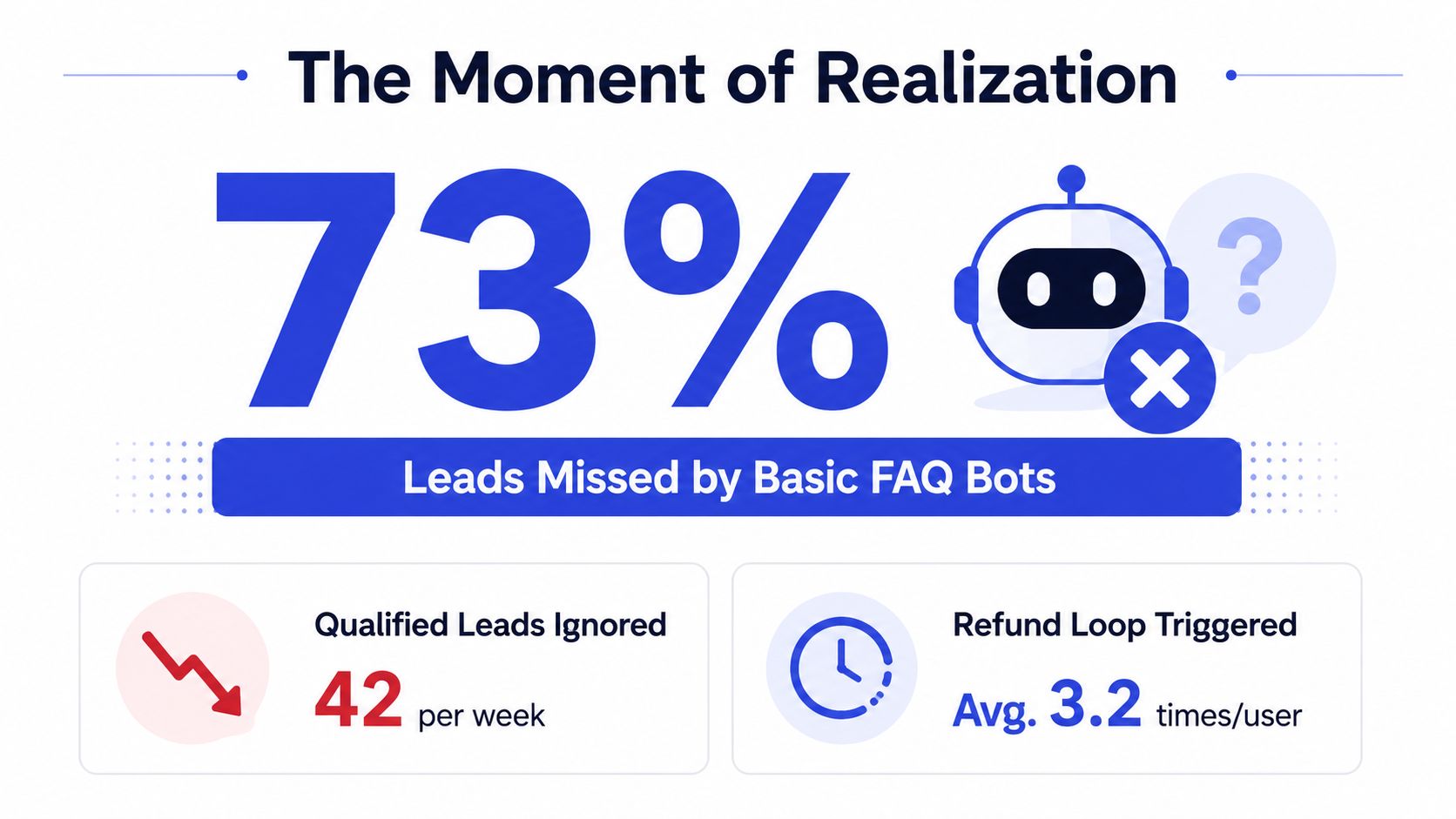
The first week of logs often looks better than it is. The agent handles greetings, repeats FAQ answers, and gives polished explanations of familiar features. Those interactions create a reassuring volume of activity, but they can hide the failures that matter commercially.
A founder I've worked with once reviewed a promising support pilot and found that the agent answered shipping questions accurately while missing buying signals on the pricing page. It also kept asking the same refund question after the customer had already answered it, then fell back when the customer described a situation outside the indexed documentation. Nothing was dramatically broken. The agent wasn't completing the jobs the team cared about.
Operator's rule: An answer can be linguistically correct and operationally useless.
The first diagnostic step is to classify conversations by intent and outcome, not by whether the response “sounds good.” Separate product education, purchase intent, account requests, complaints, refunds, and unknown questions. Then ask what happened after each interaction. Did the visitor receive a useful answer, provide qualification details, reach a human, or leave without a next step?
The operational lesson is straightforward. Agents need a defined job, a controlled route through that job, and a safe exit when they can't finish it. A general-purpose bot that tries to answer everything usually creates ambiguity around permissions, handoff, and evaluation.
A production deployment therefore rests on four connected decisions:
Intent design: Identify what the user is trying to accomplish, including indirect or unusual phrasing.
Escalation design: Specify when the agent must stop and involve a person.
Evaluation: Measure completed tasks across realistic, multi-turn conversations.
Retraining: Turn failed or low-confidence interactions into improvements to sources, routing, prompts, and rules.
Gartner projects that 40% of enterprise applications will embed task-specific AI agents by the end of 2026, up from less than 5% in 2025 according to the 2026 enterprise AI agent evidence summary. The practical implication isn't that every business needs an autonomous agent. It's that productized deployments will favor agents embedded in clear workflows over isolated demonstrations.
Prerequisites Often Overlooked Before Building
Before training, define the boundaries. A short readiness review prevents the common mistake of connecting an agent to every available document and expecting it to infer the business process.
Decide where the agent belongs
Start with the channel and the user's moment of intent. A website agent on a pricing page has a different responsibility from an internal ticket-triage agent or an email assistant. Define the supported channels, the pages or queues where the agent appears, and the actions available in each location.
List the approved sources of truth. For a customer-facing sales and support agent, these may include the current website, pricing page, product documentation, FAQs, shipping policy, cancellation policy, and selected internal procedures. Mark each source as authoritative, supplementary, or prohibited. A help article with stale pricing should never outrank the current pricing page.
Set up a data integration plan covering ownership, freshness, permissions, and removal of obsolete content. A practical reference for connecting customer information to downstream workflows is this customer data integration guide.
Define success before launch
Choose the business outcome the agent must support. Possible measures include:
Resolution rate: The customer completes the support task without a human.
Qualified-lead rate: The agent identifies buying intent and captures the required details.
Deflection rate: The agent handles suitable requests without creating avoidable tickets.
Customer satisfaction: Users rate the interaction positively through your existing feedback process.
Human agreement: Reviewers accept the agent's proposed answer or action.
Keep these measures separate. A high deflection rate can hide poor performance if the agent sends customers away without resolving the issue. Track completion quality alongside volume reduction.
Map the handoff and ownership
Name the team or person receiving each escalation type. Refunds might go to support, pricing exceptions to sales, and account changes to an authenticated operations queue. Include the context the human needs, such as the user's request, relevant conversation history, extracted account or lead details, and the reason for escalation.
Document who can change routing rules, approve new tools, and review failed conversations. A useful companion resource is this guide to building reliable AI agents, particularly when the workflow needs explicit routing and repeatable operational controls.

Finally, define a kill switch before anyone sees the agent. The owner should know which signal justifies disabling a route, source, tool, or entire deployment. If the team cannot agree on that threshold before launch, incident decisions will be slower and less consistent.
Training and Configuring the Agent for Your Business
Training an agent for production means shaping its behavior around real business material and real customer intent. Uploading documents is only the starting point. The agent also needs instructions about source priority, permitted claims, questions to ask, and actions it must avoid.
Build a source hierarchy
Connect the sources customers use, including the website, pricing pages, product pages, internal documentation, and FAQs. Clean them before indexing. Remove duplicate explanations, archive expired offers, label region-specific policies, and separate public content from internal notes that customers shouldn't see.
Give the agent a clear hierarchy. For example, current pricing overrides an old sales document, the cancellation policy overrides a casual FAQ response, and an internal escalation procedure is guidance for routing rather than customer-facing copy. Access controls should follow the same structure. An agent should retrieve only the information required for its assigned job.
A narrow scaffold often beats a broad prompt. In a software-analysis benchmark, a custom LLM agent achieved 94% manually verified task success, completing 33 of 35 tasks, compared with 77% for the best baseline the benchmark paper reports. That result supports a practical deployment choice: define a constrained workflow with explicit routing instead of asking one agent to behave as a universal operator.
Configure intent and qualification
Suppose you're deploying an agent for a SaaS company. On a pricing page, the agent should recognize direct questions such as “How much does this cost?” as well as indirect intent such as “Can this support my client accounts?” or “Do you integrate with our current workflow?”
A useful configuration might instruct the agent to ask only the qualification questions relevant to the next step:
What type of business or team will use the product?
Which workflow are they trying to improve?
What capability or integration is essential?
Should a sales specialist follow up?
The sequence matters. Asking for contact details before understanding the request feels like a form, not assistance.
Make boundaries explicit
Brand voice rules should describe observable behavior. Use concise language, acknowledge uncertainty, avoid exaggerated claims, and answer in the customer's terminology where possible. The agent should also know what it cannot promise.
It must not invent discounts, service-level commitments, custom contract terms, implementation timelines, or unavailable features. If a customer asks for one of those, the correct behavior is to explain the limit and route the conversation to a person.
Low confidence needs a defined fallback. The agent can ask a clarifying question once, offer the closest documented answer, or escalate with a concise explanation. Repeating the same retrieval attempt or producing a confident guess is not a fallback. It's a failure loop.
Designing Escalation Flows Your Team Will Actually Use
An agent that never escalates will eventually make a decision it shouldn't. An agent that escalates every unusual sentence becomes a ticket queue with extra steps. The right design treats escalation as a product feature with triggers, ownership, context, and response handling.
Set triggers by risk and failure
Use several trigger types rather than relying on sentiment alone:
Intent triggers: Refunds, account changes, legal requests, billing disputes, and contract exceptions go to a defined human route.
Conversation triggers: Repeated confusion, contradictory answers, or a failed clarification path indicate that the agent should stop trying.
Risk triggers: Requests involving sensitive data, irreversible actions, or unsupported promises require review.
Commercial triggers: A strong buying signal can route to sales when the visitor has provided enough qualification detail.
Security triggers: Prompt-injection indicators, attempts to override instructions, or suspicious tool requests should activate containment and review.
The handoff payload should be short enough to use immediately. Include the customer's latest question, a compact summary of the conversation, detected intent, captured lead details, sources consulted, and the reason the agent stopped. A human shouldn't have to reread a long transcript to understand the next action.
Design for the human queue
Escalation only works if the receiving team can respond. Assign a role, define an acknowledgement expectation internally, and make the queue visible. If the customer waits without an update, the agent's careful handoff will still feel like failure.
Smart escalation systems can gather relevant details and forward a concise summary instead of dumping the full conversation into a shared inbox. The operational patterns in this issue escalation guide are useful for turning vague handoffs into owned work.
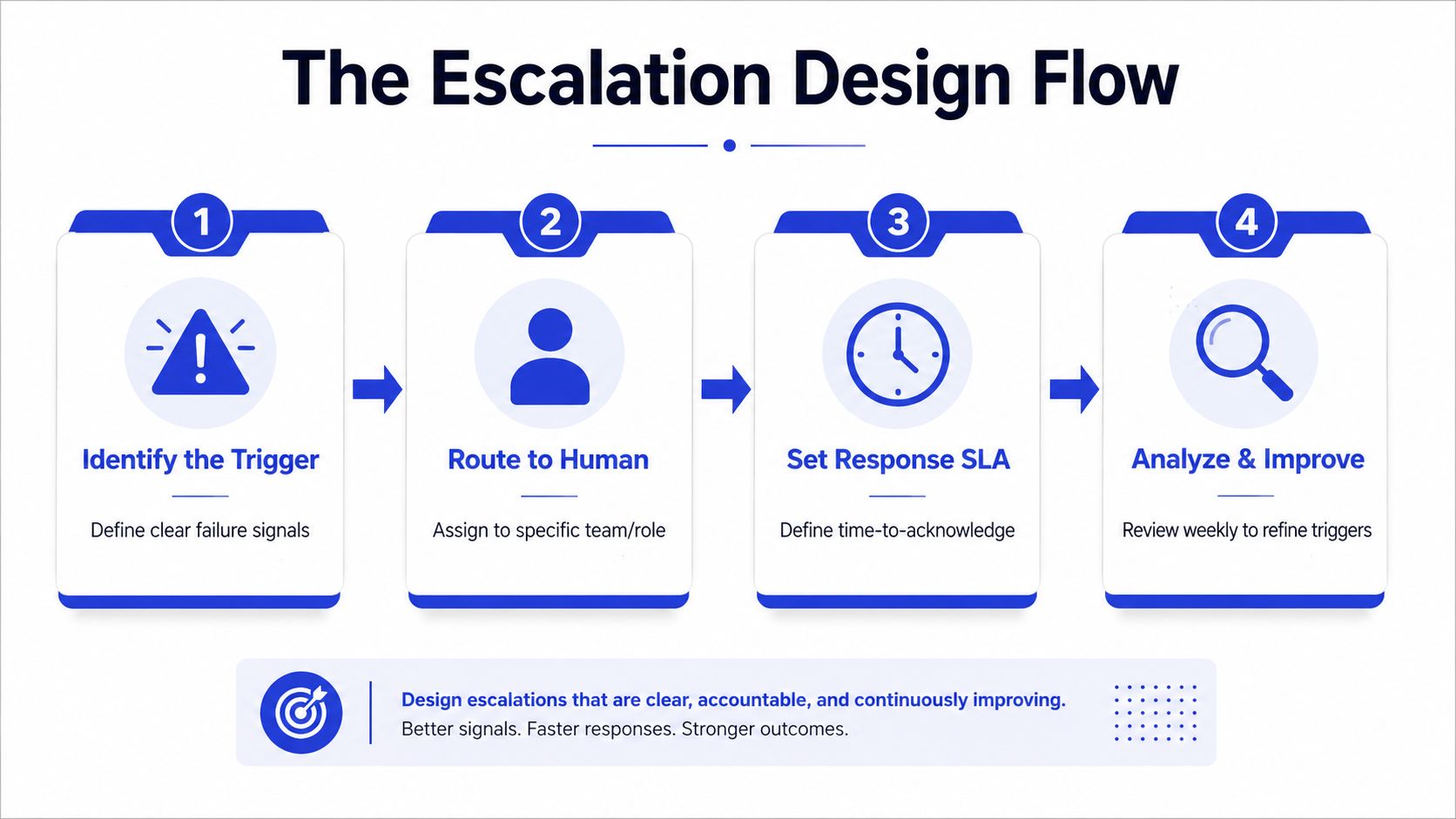
Evaluate the complete handoff, not just the agent's final message. Check whether the right team received the request, whether the summary preserved the user's meaning, and whether the human could act without asking the customer to start over.
Testing the Agent Before Real Customers See It
A polished answer to one prompt proves little. Customers switch topics, correct themselves, omit key details, dispute an answer, and return to an earlier question. Test the agent across those turns, because a system that succeeds on isolated prompts can still lose context or take the wrong action in a live conversation.
AgentBench defines success rate as completed tasks divided by total tasks and evaluates agents across eight distinct environments in its benchmark description. That definition is more useful than counting acceptable sentences. Benchmark scores still leave out cost efficiency, safety compliance, maintainability, and workflow integration, so the test set must mirror the business process, available data, permitted tools, and expected handoffs.
Use staged gates
Run testing in three phases:
Internal evaluation: Employees run scripted, multi-turn conversations while varying wording, sequence, and missing information.
Shadow mode: The agent drafts responses internally while staff continue serving customers. Compare both responses and log disagreements, unsupported claims, and missed context.
Soft launch: Expose the agent through a limited route or channel, with a tested rollback path and active review.
Build cases around ordinary questions, ambiguous requests, stale-source traps, repeated confusion, unsupported feature requests, refunds, account changes, and lead qualification. Include adversarial prompts that probe hidden instructions, policy boundaries, data access, and unsafe actions. Test whether the agent requests missing information instead of guessing, and whether each tool call receives only the permissions required for that task.
Testing Stage | What to Run | Pass Threshold | Failure Mode Caught |
|---|---|---|---|
Internal evaluation | Scripted multi-turn conversations and edge cases | Every critical path reaches the correct answer, handoff, or refusal | Broken routing and incomplete task handling |
Adversarial review | Prompt-injection attempts and policy-boundary requests | No restricted instruction or action is exposed | Unsafe tool use and policy violations |
Regression testing | Existing FAQs, pricing questions, and known failure transcripts | Previously fixed cases remain correct after each change | Retraining regressions |
Shadow mode | Internal responses against live conversation patterns | Humans can identify errors before customer exposure | Unknown phrasing and integration gaps |
Soft launch | Limited customer traffic with live monitoring | No unresolved critical safety or routing issue | Production-only failures |
Re-run multi-turn cases after prompt edits, knowledge-base changes, permission changes, and retraining. Keep failed transcripts with the expected action, not just the preferred wording, so reviewers can detect a wrong escalation, an unsafe tool call, or a confident answer from stale data.
Approve launch only when the team can name the remaining failures, assign ownership, and stop the system if risk changes. “Usually correct” is not a release criterion.
Deploying in Phases and Monitoring What Matters
Deployment should proceed from controlled use to wider exposure. Start with internal users, then release one channel or high-intent route, then expand only after the evidence supports it.

During the internal phase, review tool calls, source retrieval, escalation summaries, and conversations where the agent asked for clarification. In a soft launch, watch containment, resolution, escalation latency, qualified-lead volume, customer feedback, and the rate at which human reviewers agree with the agent's draft answer. Broad rollout should include the same measures, plus alerts for unusual tool activity, repeated failure loops, and sudden shifts in intent distribution.
Governance and security often determine the calendar more than model availability. 86% of organizations reported AI-agent deployment delays averaging 5.92 months because of unresolved data security and data management concerns, according to the State of AI 2026 reporting. Treat access controls, auditability, escalation design, and production-like testing as part of the deployment plan, not as a final approval step.
A weekly review should turn monitoring into action. Take the lowest-rated conversations, group them by root cause, and decide whether the fix belongs in the source material, intent taxonomy, prompt, escalation rule, or human operating process. Retraining isn't just adding more documents. It's correcting the system that produced the failure.
For teams reviewing security controls, this practical resource on how to mitigate AI agent threats can help structure the risk discussion. Keep analytics tied to decisions, rather than collecting dashboards no one opens. A focused chatbot analytics workflow should show which conversations need investigation and which changes improved outcomes.
A deployment walkthrough can also help teams visualize the relationship between the customer interface, routing, and human follow-up:
A useful operating rhythm is simple: review failures, assign an owner, ship a targeted change, run the regression set, and compare the next period with the prior baseline. That rhythm keeps the agent from drifting into a static FAQ widget.
Common Pitfalls and the Deployment Checklist You Can Run Today
The same avoidable mistakes appear across otherwise capable deployments:
Stale training data: Connect the agent to owned sources and assign someone to review pricing, policies, and product changes.
No escalation path: Define triggers, destinations, summaries, and human ownership before launch.
Launch treated as completion: Schedule recurring evaluation and retraining from the start.
Broad permissions: Give the agent the smallest tool and data access needed for its job.
Prompt-injection exposure: Test adversarial inputs and monitor suspicious tool requests continuously.
Unclear success criteria: Choose an outcome such as resolution, qualified leads, or customer satisfaction.
Ignored operating-model change: Prepare the human team for new queues, summaries, approvals, and feedback responsibilities.
Before cutting over, verify the sequence:
Approved data sources are connected and current.
Intents, qualification rules, and fallback behavior are configured.
Escalation triggers and owners are documented.
Multi-turn, adversarial, and regression tests pass.
Monitoring covers quality, safety, latency, and handoff outcomes.
Retraining and weekly review responsibilities are assigned.
Security, permissions, and the kill switch have been reviewed.
Chatgrow supports this customer-facing workflow by letting teams train agents on website content, pricing, FAQs, and product pages, define qualification rules, deploy on selected pages, and route complex conversations to humans with summaries. If you're ready to test that operating model on your own site, visit Chatgrow and start with one high-intent workflow rather than your entire support operation.
Related Posts
Continue Reading
More articles from the ChatGrow Team.


