Blog
Top Mobile CRM Application Features for SMBs in 2026
By
Nelson Uzenabor

A mobile CRM application can be more than a smaller version of desktop software. Mobile CRM users report a 14.6% productivity improvement, and organizations using mobile CRM are reported as 150% more likely to exceed sales goals in a 2026 CRM data summary from Wave Connect's CRM statistics overview. The important question for an SMB founder isn't whether a phone app looks modern. It's whether the app helps people capture accurate information, complete work without reliable connectivity, and hand the right context to the next person or system.
A strong mobile CRM connects sales, service, marketing, and operations around one customer record. It can give a sales rep the history of a prospect before a meeting, let a service worker log a visit from a driveway, or send a qualified lead to the right owner while the founder is away from a desk. The best choice depends less on the longest feature list and more on workflow fit, integration quality, data discipline, and practical adoption.
Table of Contents
What a Mobile CRM Application Actually Does
A mobile CRM application is customer relationship management software built for smartphones and tablets. It lets users view and update contacts, deals, tasks, notes, and customer activity through a touch-friendly interface. A phone browser may open a desktop CRM, but a dedicated app usually makes frequent actions easier, uses device capabilities, and continues working when the connection is unreliable.
A mobile CRM works like a pocket notebook connected to a shared whiteboard. A sales representative records a meeting result in the notebook, then the wider team sees the update on the shared board after synchronization. The mobile record travels with the representative, while the shared record prevents information from remaining in one person's memory or device.
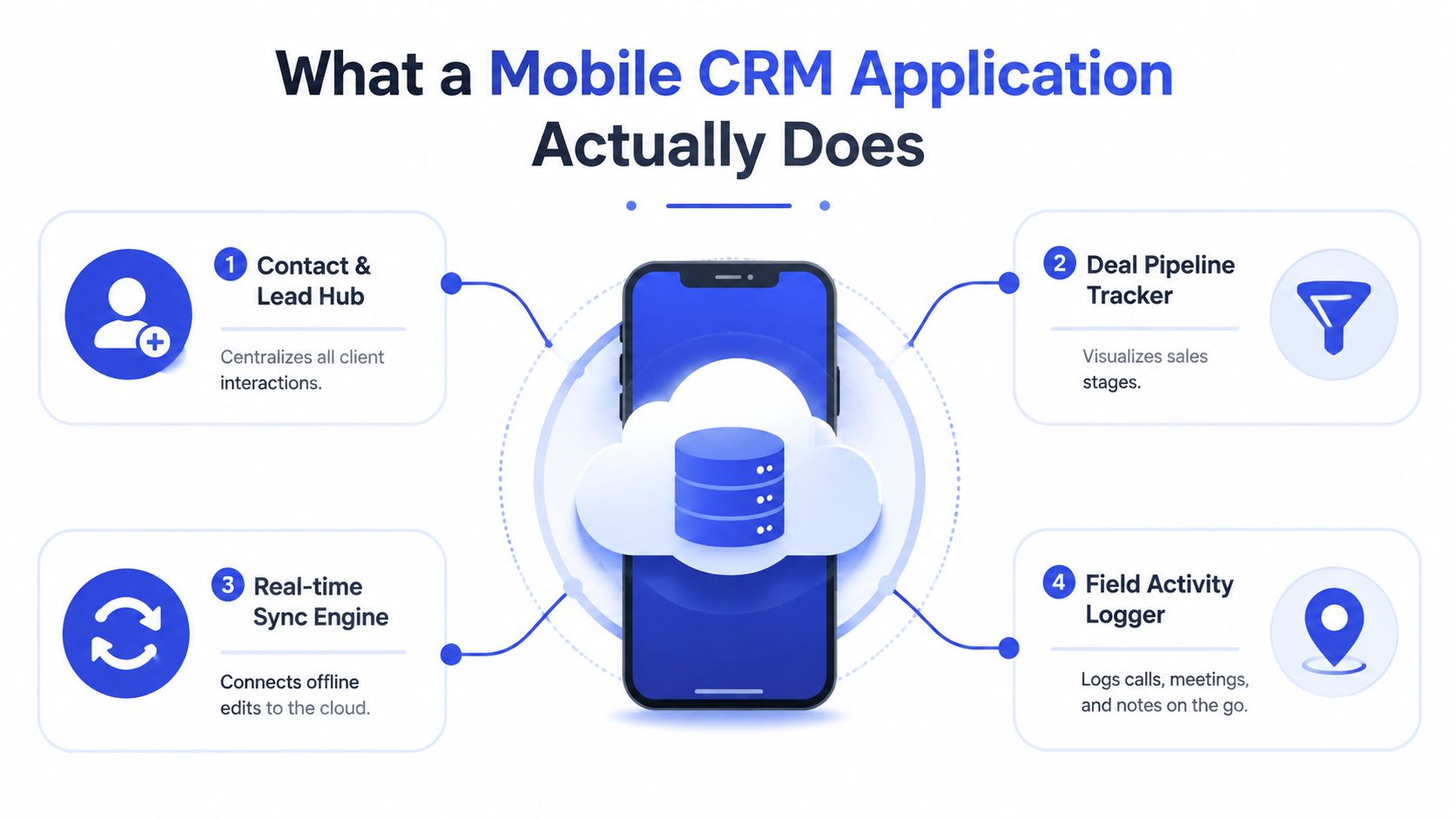
The four jobs that matter
A practical app should connect four jobs:
Contact and lead management: Store names, companies, contact details, source information, and interaction history together.
Deal and pipeline tracking: Show where an opportunity sits, what action comes next, and who owns it.
Activity logging: Record calls, meetings, messages, visits, and notes while details are still fresh.
Mobile summaries: Give a representative a useful customer snapshot between appointments instead of forcing a search through email threads.
The value comes from how these jobs join into one workflow. A lead captured from a website should become a contact, receive an owner, appear in a pipeline, and create a follow-up task without repeated copying. That handoff also depends on integration and data quality. If a form, email tool, or service system sends incomplete or duplicate records, the mobile app spreads bad information faster.
AI agents add another handoff to examine. An agent may summarize a call, suggest a next action, or prepare a lead for assignment. The CRM still needs clear fields, permissions, and approval rules so a suggestion does not become an inaccurate customer record. Feature count matters less than whether the workflow carries reliable context from one step to the next.
The mobile CRM market is expanding, with estimates placing its global value at $36.24 billion in 2026 compared with $31.36 billion in 2025, and another projection covering growth from $22.9 billion in 2023 to $68.0 billion by 2033 at an 11.5% CAGR, as reported in Wave Connect's mobile CRM market data. These figures show an established software category, not proof that every business needs a complex platform.
Practical test: If staff regularly meet customers, travel, work across locations, or respond outside the office, mobile access deserves serious evaluation. If everyone works from one desk and updates a small contact list, a simpler system may be enough.
For a plain-language explanation of mobile sales workflows, review this CRM for mobile guide. It helps SMB owners distinguish genuine mobile workflows from a desktop screen compressed onto a phone.
Must-Have Features Every Mobile CRM Should Include
A vendor demo should begin with your team's daily work, not with a tour of every menu. Ask a rep to create a lead, update a deal, log a meeting, and find a customer record from a weak connection. If those basic actions feel slow or confusing, advanced analytics won't rescue adoption.
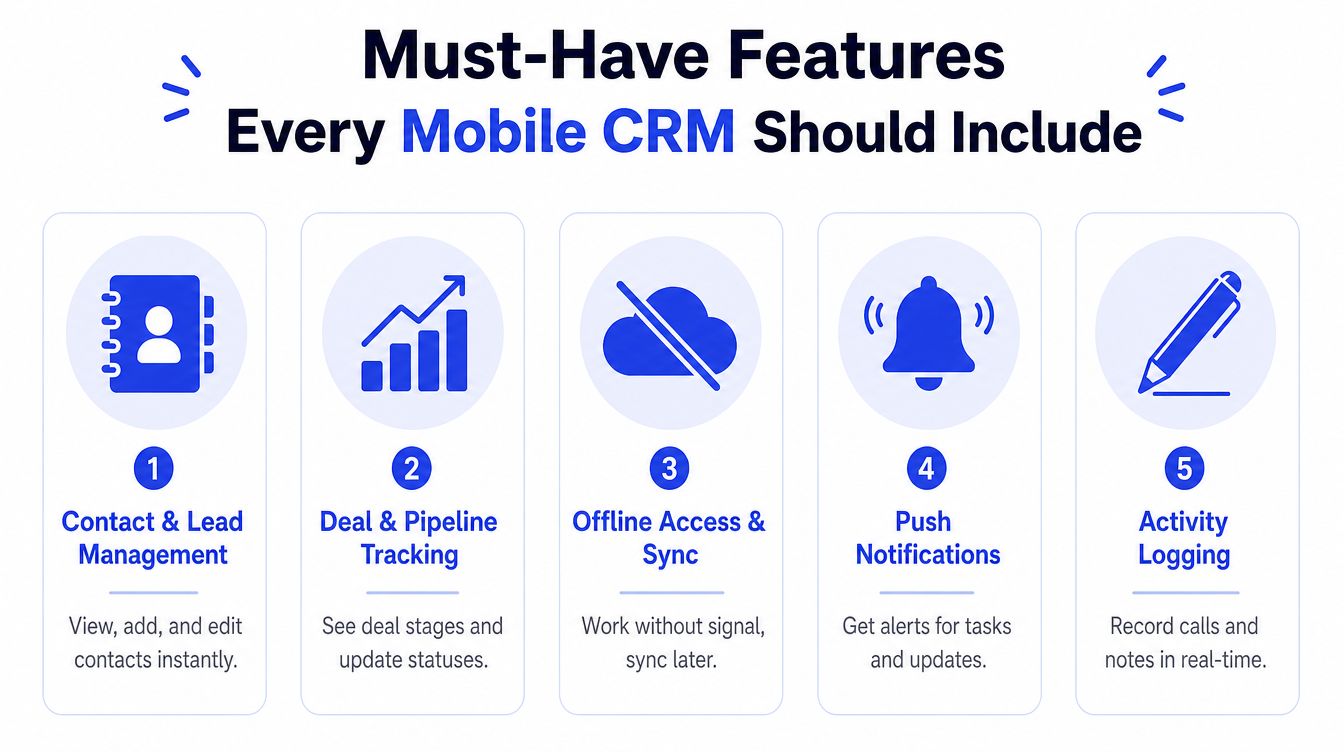
Contact and lead management
A rep meeting a wholesale buyer should be able to add the person, associate the buyer with a company, record the source, and schedule the next action before leaving the meeting. The record should show recent conversations and open tasks without making the user search through unrelated modules.
Data quality matters here. A mobile CRM should help prevent duplicate contacts, distinguish a person from an account, and make ownership clear. A beautiful interface that creates inconsistent records will weaken reporting and future automation.
Deal and pipeline tracking
A pipeline view should answer three questions quickly: What is open, what changed, and what happens next? Reps need to move a deal between stages, update its expected outcome, and add a note that explains the change. Managers need confidence that the visible pipeline reflects real conversations rather than stale desktop updates.
Offline access and synchronization
Field teams shouldn't lose work because a lift, basement, rural road, or crowded venue interrupts service. Offline access lets users view permitted records and make approved edits locally, then synchronize those changes when connectivity returns. The app must also explain conflicts clearly when two people update the same record.
Push notifications and activity logging
Notifications should surface meaningful events, such as an assigned lead, a changed deal, or an overdue task. Too many alerts train users to ignore all alerts. Activity logging should be faster than opening a separate note-taking tool, especially after calls and meetings.
Integrations and security
The app needs reliable connections to email, calendars, forms, messaging channels, billing tools, support systems, and automation platforms. Look for documented APIs, webhooks, export options, permission controls, device session management, and audit history. A CRM that cannot exchange clean data with the rest of your stack will create another silo.
Use this short checklist during demos:
Core records: Can users view and edit contacts, companies, leads, deals, and tasks?
Field work: Can the app operate offline and show synchronization status?
Automation: Can an event trigger a webhook, notification, assignment, or follow-up?
Security: Can administrators control access by role, team, field, and device?
Data portability: Can your business export its records in a usable format?
For a practical look at lead qualification workflows that can connect to CRM records, see this guide to automated lead scoring.
A minimum viable mobile CRM isn't defined by AI, voice commands, or visual polish. It's defined by whether a user can complete the next important action with accurate data and little friction.
Why Offline Sync and Architecture Matter More Than Demo Polish
A polished demo usually happens on a fast connection, with prepared records and a presenter who knows exactly where to tap. Field work is less controlled. A rep may be entering a note in a taxi, a technician may be inside a building with poor reception, and a founder may need a customer record while traveling internationally.
The underlying architecture determines what happens next.
Three architecture patterns
A native app is built for a particular mobile operating system. It behaves like a fitted tool, usually offering strong device integration and responsive touch interactions. A web-based app behaves more like a Swiss Army knife, because one interface can work across devices, but its experience depends more heavily on the browser and connection. A hybrid app sits between them, combining shared code with some native device capabilities.
No pattern wins automatically. The right choice depends on whether your team needs offline records, camera access, location-aware workflows, background synchronization, or a broad range of devices. Ask vendors to demonstrate the exact actions your field users perform, rather than relying on architecture labels.
Why offline-first changes trust
Offline-first design stores permitted data and pending changes on the device. Local read and write interactions can remain under 5 ms because they hit the on-device database directly, according to a comparative mobile synchronization study published by Universitas Malikussaleh. The same source describes network-dependent real-time push propagation as typically 50 to 200 ms under ideal connectivity, while offline-first performs better in low-bandwidth settings.
That difference isn't just technical. If a rep records a visit with no signal and later discovers the note never arrived, the rep stops trusting the system. Once trust disappears, staff return to paper, personal notes, or chat threads that managers can't see.
Dataset size creates another constraint. Sync latency can rise sharply as customer records, histories, and attachments grow, so a sensible design partitions data and synchronizes only what the user needs. A USENIX study on mobile application synchronization also highlights that network round-trip time can represent only a small part of total synchronization time. The app's local processing, payload size, and conflict handling can matter just as much.
Questions to ask before signing
Ask whether records are encrypted on the device, how long pending edits remain locally, what happens when two users change one record, and whether users can see failed synchronization. A clear explanation of these behaviors is more valuable than a feature showcase.
For readers who want a more technical explanation of synchronization concepts, this data synchronization tutorial from AppLighter provides useful background. Also examine how the proposed app will exchange information with your current systems through a documented approach to customer data integration.
How to Compare Vendors Without Drowning in Demos
Vendor selection becomes clearer when every finalist faces the same business scenario. Feature count matters less than workflow fit. Ask which platform lets your team complete frequent work with fewer corrections, workarounds, and administrative steps.
Start with a real sales motion. A field service business might test offline visits, location context, and rapid activity notes. A SaaS company might test account history, support handoffs, product usage signals, and billing connections. An e-commerce brand might test lead capture from forms, messaging channels, and wholesale inquiries. The right CRM should also pass structured information to customer service tools and, where relevant, leave clean context for an AI agent or human handoff.
A practical comparison table
Criterion | What to Test | Red Flag |
|---|---|---|
Sales motion fit | Run a real lead-to-close workflow on the phone | The vendor demonstrates generic screens instead of your process |
Integration ecosystem | Connect email, calendar, forms, support, and automation tools | The answer depends on manual exports or undocumented workarounds |
Mobile UX | Ask a new user to create, update, and search records | Navigation is cluttered or common actions require too many taps |
Offline behavior | Disable the connection and create or edit records | The app freezes, hides pending changes, or cannot explain conflicts |
Total cost of ownership | Include setup, migration, training, administration, and future customization | The subscription looks affordable, but implementation needs specialist help |
Data portability | Request a sample export and review field mapping | The vendor is vague about exports, ownership, or deletion |
Run the same test with every finalist
Prepare one short script: add a prospect, assign ownership, create a follow-up, move the opportunity, log a call, search for the account, and export the record. Have someone outside the vendor briefing perform it. Their confusion is useful evidence because ordinary users will not share the presenter's mental map.
Test the handoff between systems, not only each screen. Create a lead, send it to your support process, update its status, and check whether the receiving tool gets the owner, history, and next action. For teams evaluating customer service software for small business, this check shows whether the CRM supports one connected customer record or creates another isolated inbox.
Evaluate price as total cost of ownership, including data cleanup, configuration, integration maintenance, training, support, and the owner or operations lead's administration time. Customization may suit a complex process, but it can also increase future maintenance. Data quality belongs in the same review. Ask who defines fields, removes duplicates, and checks whether automation or an AI agent receives reliable context.
For a broader starting point, this guide to comparing CRM tools for startups offers additional context. Keep the shortlist narrow enough for every vendor to receive the same test.
Your final choice should feel slightly boring in the best way. The right app makes the next action obvious, preserves context across connected tools, and fits habits your team already has or can realistically build.
Real-World Use Cases for SMBs, E-commerce, and SaaS
A small e-commerce brand may receive a wholesale inquiry through Instagram while the founder is away from a laptop. The founder creates a lead in the mobile CRM, adds the product interests, assigns the inquiry to a sales rep, and schedules a follow-up. The rep sees the source and conversation history, then continues through the approved email or messaging workflow instead of asking the customer to repeat the request.
The value isn't merely speed. The CRM preserves the connection between marketing source, sales ownership, product interest, and next action. If the buyer later asks about pricing or delivery, the team can see the context rather than searching across personal inboxes.
A SaaS startup uses the same pattern differently. During a customer call, a customer success manager logs a support concern against the account, links it to the relevant product area, and records the promised follow-up. If the issue requires engineering or billing, the CRM can pass the structured details into the appropriate system instead of leaving the request inside a free-form note.
The after-hours handoff
Suppose an AI customer-service agent handles a question outside business hours. The agent can answer routine questions from approved knowledge, collect the visitor's company and need, and identify when a human should review the request. The mobile CRM then becomes the handoff layer. It stores the lead or support context, assigns an owner, and sends a notification containing a concise summary.
That handoff only works when the fields are consistent. “Interested in enterprise plan” is more useful than a vague transcript if the CRM also stores company, intent, urgency, requested follow-up, and consent where appropriate. The AI should not invent missing details, and the human team should know which information came from the customer and which came from automation.
Agencies, travel businesses, educational institutions, and service companies can apply the same model. The channel changes, but the pattern remains: capture the interaction, preserve the context, route the work, and make the next human action clear.
Implementation and Adoption Tips That Actually Stick
A mobile CRM rollout fails when the software exists but the workflow doesn't. Staff may install the app, open it once, and return to familiar tools because the records are incomplete or the mobile form asks for information they don't have during a real customer conversation.
Treat implementation as a behavior project.
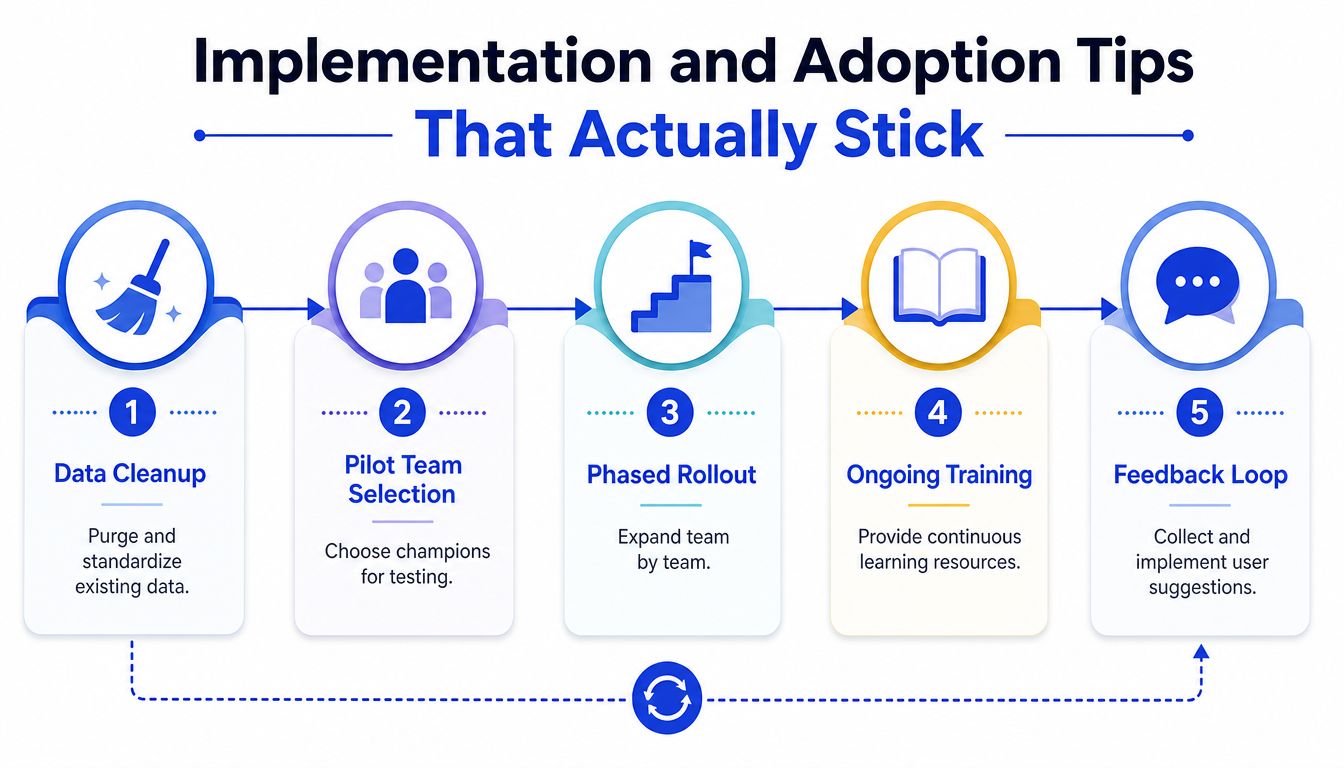
Start with clean records
Before importing anything, define the fields your team needs. Standardize company names, contact ownership, lifecycle stages, phone formats, and consent information. Remove duplicates and decide how to handle old records that no longer have a useful business purpose.
A smaller, cleaner data set is easier to trust than a large collection of incomplete records. The mobile app should expose the information needed for the next action, not every historical field your old system accumulated.
Pilot with real users
Choose a small pilot group that includes a frequent user, a skeptical user, and someone who understands operations. Give them real scenarios, such as logging a visit, finding an account before a call, and updating a deal without connectivity. Ask where they hesitate and which fields they skip.
Then configure mobile defaults around what they do.
Reduce form friction: Keep required fields limited to information available at the moment of entry.
Set useful alerts: Notify users about assignments, urgent changes, and overdue actions, not every system event.
Make ownership visible: A user should know who handles the next step without opening several records.
Show sync state: Pending, completed, and failed changes should be obvious.
Roll out in a short feedback cycle
A practical first-week plan is simple. Clean and map the initial data, configure the pilot workflow, test offline behavior, run a real meeting through the app, and review user feedback at the end of the week. Expand only after the pilot team can complete core actions without coaching.
Measure behavior rather than vanity activity. Look at weekly mobile logins, completed follow-ups, pipeline updates, activity records, duplicate creation, and failed synchronization. These signals reveal whether the app has entered the workday.
Connect an AI agent carefully
An AI service agent or lead-qualification agent should pass structured information into the CRM. The sequence can be:
Capture: The agent receives the visitor's question or request.
Qualify: It identifies intent, business context, urgency, and requested next step.
Store: The CRM creates or updates the relevant contact and activity.
Notify: The assigned rep receives a summary and a clear action.
Review: A human corrects bad data and improves the qualification rules.
Keep the handoff narrow at first. An AI agent should not write unrestricted notes into every field or change deal stages without safeguards. Give it approved fields, clear escalation rules, and a way to flag uncertainty.
Common Pitfalls and How to Avoid Them
The most common mistake is treating a mobile CRM as a desktop interface reduced to a smaller screen. Desktop software can tolerate dense menus and long forms because users have more space and time. A phone workflow needs a clear priority, fast search, obvious status, and a short path to the next action.
Fix: Ask vendors to demonstrate the app with one hand, under a realistic time constraint, using the records your team knows. Remove fields that don't influence a decision or follow-up.
Treating AI as a substitute for data quality
AI can summarize, classify, and route information, but it can't repair a confused account model by itself. Duplicate companies, inconsistent stages, missing ownership, and disconnected support records will give an automated agent unreliable context.
Fix: Define the source of truth for contacts, accounts, products, tickets, and orders before connecting AI. Store structured outcomes alongside summaries so reporting and routing remain dependable.
Ignoring weak connectivity
An app that works only with a strong connection may fail at the exact moment a field worker needs it. Worse, silent synchronization failure can make users believe their work was saved when it wasn't.
Fix: Test airplane mode, interrupted connections, large records, attachments, and conflicting edits. Require visible synchronization status and a recovery path for failed changes.
Creating data silos
A mobile CRM can become another isolated app if email, forms, support, commerce, billing, and messaging data don't flow into a shared customer view. Users then copy information manually, and every copy creates an opportunity for inconsistency.
Fix: Draw the data journey before selecting integrations. Identify where a record begins, which system owns it, what events should trigger updates, and which fields must remain synchronized.
Over-customizing the experience
Every extra field may seem harmless to an administrator. For a rep standing outside a customer's premises, it can turn a quick update into an abandoned form.
Fix: Launch with the smallest useful configuration. Review skipped fields and repeated workarounds after the pilot, then add customization only when it removes a real obstacle.
The adoption rule: Clean data and a short workflow usually create more value than another layer of features.
Security also needs a mobile-specific baseline. Use role-based access, device session controls, remote logout or revocation where available, encryption, audit history, and careful permissions for contacts, location, camera, and files. A lost phone shouldn't automatically become a lost customer database.
Quick Checklist and FAQs Before You Choose
Use this final check before approving a vendor:
Workflow: Can users complete the core sales or service action from the phone?
Offline mode: Can they read, write, and verify synchronization without a signal?
Data quality: Are duplicates, ownership, stages, and required fields controlled?
Integration: Can the app exchange structured data with your current systems?
Security: Are access, device sessions, exports, and audit activity manageable?
Adoption: Can you pilot, train, measure usage, and adjust the workflow?
AI handoff: Can an agent pass a qualified summary to a human with clear ownership?
How long does an SMB rollout take?
It depends on data condition, integrations, permissions, and workflow complexity. Start with a contained pilot rather than promising a broad launch date. Move forward when pilot users can complete real tasks and recover from synchronization problems.
Can a mobile CRM replace a helpdesk?
Usually, it shouldn't replace a dedicated helpdesk if you need queue management, service-level policies, knowledge workflows, or detailed ticket operations. It can provide the customer context and ownership layer that connects support activity with sales and account management.
What security baseline should you require?
Require controlled permissions, encrypted data handling, device access management, audit visibility, export controls, and a documented process for lost devices and former users. Ask vendors to explain these controls in plain language before you approve the app.
The strongest setup pairs a focused mobile CRM with an AI agent that handles routine questions and qualification, then sends structured, human-ready work to the team.
Chatgrow helps SMBs create, train, and deploy AI customer-service agents that answer FAQs, qualify leads, and escalate conversations with concise summaries for human follow-up. Visit Chatgrow to connect AI coverage with your mobile CRM workflow and turn after-hours conversations into organized next actions.
Related Posts
Continue Reading
More articles from the ChatGrow Team.


