Blog
Sales Enablement Platform: The 2026 Buyer's Guide
By
Nelson Uzenabor

The worst advice about a sales enablement platform is also the most common: buy the biggest suite you can afford and figure out the rest later. That logic puts rep productivity ahead of the only thing that matters: the buyer's experience. If the platform doesn't reduce friction for the buyer, make handoffs cleaner, and help you answer questions faster, you've bought software theater.
By 2026, the category is no longer small or experimental. One market estimate puts the sales enablement platform market at USD 7.40 billion in 2026, up from USD 6.36 billion in 2025, and projects it to reach USD 33.90 billion by 2036 at a 16.4% CAGR. It also says cloud-based deployment is expected to account for 74% of deployment demand in 2026, which tells you where buying is headed, toward flexible, web-delivered systems, not heavy on-premise installs. Future Market Insights market estimate
The bigger shift is operational, not just financial. A 2023 Highspot-based survey reported that 90% of organizations had a dedicated sales enablement team or program, up from 75% in 2022, a 15-point increase in one year. In the same 2026 statistics roundup, Gartner data cited there says sellers who effectively partner with AI tools are 3.7 times more likely to meet quota than those who don't, based on 1,026 B2B sellers surveyed from January to March 2024. Sales enablement statistics roundup
Table of Contents
Why Most Teams Buy the Wrong Sales Enablement Platform
Many teams start with the wrong question. They ask which suite has the most features, the deepest content library, or the most polished admin console. They should be asking a simpler one: does this platform make the buyer's path easier, faster, and less repetitive?
A sales enablement platform is supposed to connect what marketing creates, what reps say, and what buyers need. Gartner's market guide describes these platforms as uniting enablement functions with customer-facing sales execution, while Salesforce notes that many implementations combine an LMS for training, a CMS for sales materials, and CRM-linked tracking for usage and outcomes. That architecture matters because it creates a traceable chain from asset consumption to rep behavior, which is the only way to tell whether enablement is helping or just sitting there. Gartner market guide PDF
The real mistake is buying for internal comfort
Most vendor demos are built for managers, not buyers. They showcase dashboards, content folders, and adoption reports, then imply those things create revenue. They don't, unless they change what happens in the live buying process.
Practical rule: If the tool doesn't help a rep answer the buyer's next question faster, it's probably too much platform for the job.
Smaller stacks often beat the big suite. A focused layer that handles qualification, content surfacing, or handoff summaries can improve the buyer experience without forcing your team to manage a sprawling admin system. That's especially true if your team doesn't have someone whose job is to live inside enablement software all day.
The other blind spot is buyer-side impact. A lot of category content talks about rep efficiency, but far less of it asks how the software changes buyer behavior, reduces friction across the journey, or supports a smoother post-sale transition. That gap matters more in 2026 than it did a few years ago, because buyers expect fast answers and coordinated handoffs, not separate internal systems pretending to be strategy.
What a Sales Enablement Platform Actually Does
Think of a sales enablement platform as a control tower, not a folder system. A folder stores assets. A control tower connects content, training, coaching, analytics, and CRM activity so the revenue team can see what's happening while the buyer is still moving.
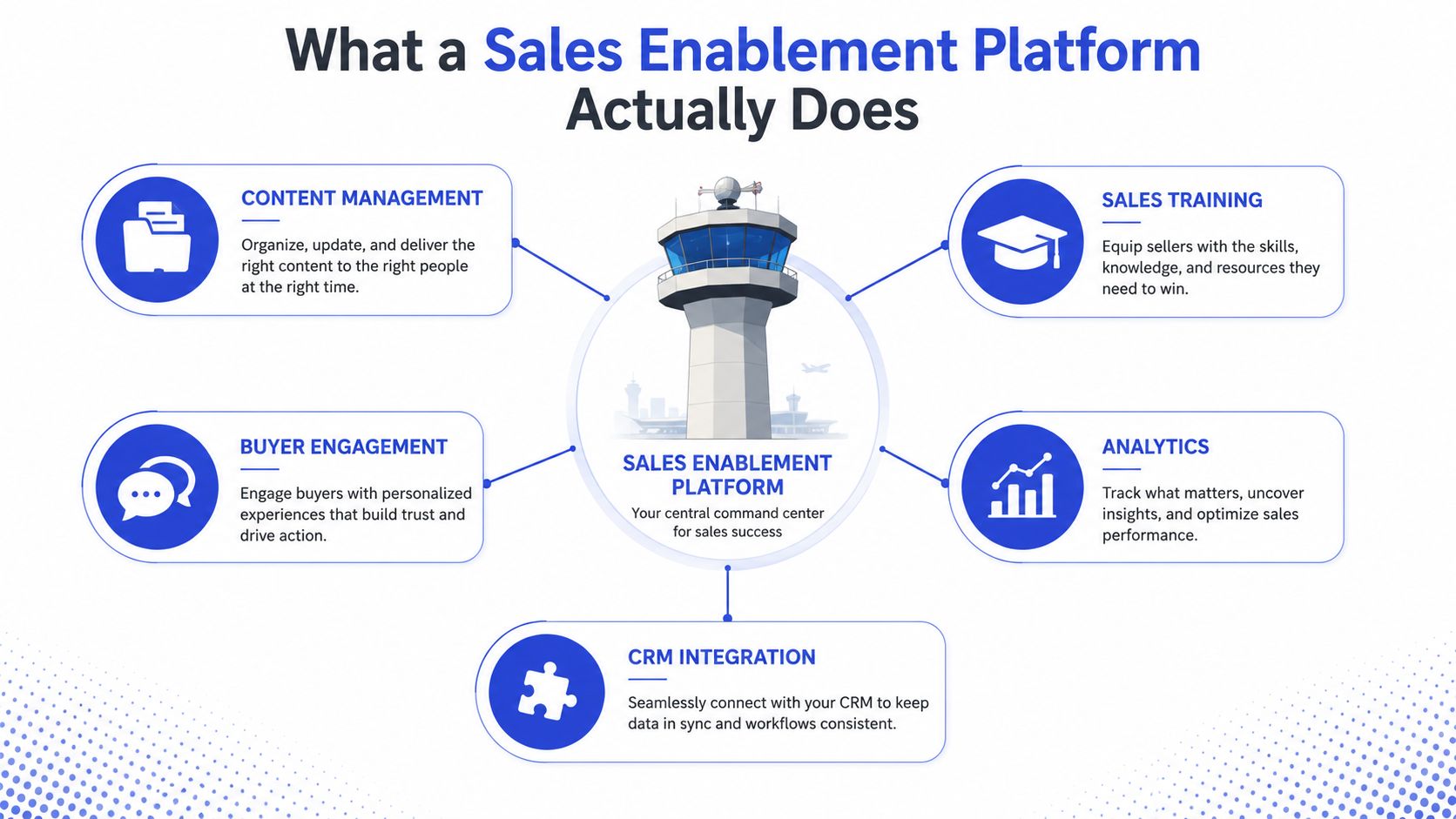
The five pillars are straightforward, but the value comes from how they connect. Content management keeps one source of truth for decks, one-pagers, battle cards, and follow-up materials. Training and coaching make sure reps know what to do with those assets. Analytics show whether buyers engaged, where reps struggled, and which content got used. Buyer engagement captures what happens after the asset gets shared. CRM integration ties all of it back to the opportunity record so the team can see the full chain of activity.
From asset storage to behavior tracing
That chain is what separates a real platform from a document library. If a buyer opens a one-pager at 11 p.m., the useful question isn't just whether the file exists. It's whether the system can show that engagement, connect it to the rep's follow-up, and surface the next best action.
A practical example helps. If a rep sends a proposal and the buyer clicks the pricing page twice, the platform should not just log a view. It should help the rep respond with the right material, the right timing, and the right context. That's the difference between enablement as a repository and enablement as a revenue system.
What to expect in a demo
Demand to see these flows, not just screenshots.
Content movement, from upload to buyer share to engagement tracking.
Training reinforcement, from onboarding material to in-workflow prompts.
CRM linkage, from content view to opportunity update.
Analytics, from raw usage to rep behavior and buyer response.
If a vendor can't show that chain cleanly, the platform is probably more complicated than useful. The software should make the handoff between marketing, sales, and customer success easier, not force each team to maintain its own version of the truth.
Core Features That Matter in 2026
The useful features in 2026 are the ones that do real work during the buying cycle, not the ones that look impressive in a slide deck. AI has pushed the category away from static libraries and toward active guidance, but only if the platform is wired into daily workflows.
Content, playbooks, and AI guidance
Content management now has to do more than store files. It should tag assets intelligently, map them to the buyer journey, and make the right one easy to surface in the moment. Dynamic playbooks matter more than static PDFs because buyers don't follow neat scripts, and reps need guidance that changes with the conversation.
Conversational AI becomes useful here. If a buyer asks a late-night product question or leaves a high-intent form submission, a platform with AI-driven qualification and routing can keep the conversation moving instead of leaving it idle until morning. That doesn't replace a rep, but it does prevent avoidable drop-off.
The best feature is the one a rep uses without thinking.
Training, coaching, and analytics that matter
Training should not live in a separate system that reps forget about after onboarding. The better setup embeds coaching reinforcement at the moment of need, so a rep gets nudged when a pitch drifts, a message is inconsistent, or a skill gap shows up in a live conversation. That's the difference between a learning portal and actual enablement.
Analytics should also get more specific. Vanity dashboards are useless if they only tell you how many people logged in. You want instrumentation tied to content views, training completion, coaching reinforcement, and CRM opportunity activity, because that's what lets managers see which assets and behaviors move deals forward.
For teams trying to connect those signals to a cleaner customer record, customer data integration guidance is worth a look because the platform only works when the data flow is stable.
What to use weekly and what to skip
A good rule is to ask whether a feature changes a weekly workflow.
AI-tagged content, useful if reps waste time searching for the right collateral.
Dynamic playbooks, useful if your messaging changes by segment or stage.
In-the-moment coaching, useful if managers can't sit in every call.
Deal-level analytics, useful if you need more than login counts.
Conversational qualification, useful if high-intent inbound traffic needs immediate handling.
If a feature won't get touched every week, it's probably not worth paying for in a small team. The category can do a lot, but that doesn't mean your team should buy all of it at once.
How SMBs, Agencies, and SaaS Teams Use Them Differently
The same platform category behaves very differently depending on the team using it. A founder-led SMB doesn't need the same configuration as a client-facing agency or a product-led SaaS team. Buying the wrong shape is how teams end up with shelfware.

SMBs need coverage, not complexity
For SMBs, the best setup is lean. A small content library, clear qualification rules, and conversational AI at the point of contact usually beat a full suite with six modules no one opens. The goal is to cover more inbound traffic without hiring another rep too early.
That usually means fewer moving parts. You want the buyer to get a fast answer, the rep to get a clean handoff, and the founder to see what's happening without logging into another dashboard. Anything beyond that should earn its place.
Agencies need repeatable client delivery
Agencies and consultants have a different problem. They're not just enabling one brand, they're often deploying a system across multiple client sites or client motions. That makes white-labeling, multi-client structure, and content governance more important than fancy internal coaching layers.
For an agency, enablement has to be portable. If the workflow can't be adapted across accounts without breaking the process, it's too rigid. They need tools that help them standardize delivery without making every implementation feel custom from scratch.
SaaS teams care about ramp and handoff
SaaS teams usually care most about onboarding ramp time and the handoff from sales to customer success. They need sales content, sure, but they also need a clean transition after the deal closes, because the buyer experience doesn't end at signature. If the promises made in sales don't match the first post-sale interactions, churn starts early.
Here's the blunt version. SMBs should avoid buying for the future if the future isn't staffed yet. Agencies should avoid tools that can't be cloned across clients. SaaS teams should prioritize handoff quality over deck polish.
The Buyer-Experience Evaluation Checklist
Score vendors on how they change the buyer's path, not on how many internal features they can list. That's the simplest way to separate a useful platform from a bloated one. If the buyer has to wait, repeat themselves, or get handed the wrong asset, the platform is failing where it matters.
A good reference point is the 2026 sales intelligence guide. Use it for context on how sales intelligence and enablement overlap, but don't let the category blur the decision. Intelligence should improve the buyer's next step, not just add more data to the stack.
Score what the buyer actually feels
Use this scorecard in a live demo and keep the scoring strict.
Criterion | What to Look For | Question to Ask the Vendor |
|---|---|---|
First-response latency | How fast a high-intent buyer gets a useful reply | How does the platform handle an urgent inbound question after hours? |
Intent capture | Whether it records real signals, not just form fills | What buyer actions trigger routing or follow-up? |
Relevant content surfacing | Whether reps get the right asset during a live conversation | How does the system recommend the next piece of content in context? |
Handoff quality | Whether summaries are concise and usable by humans | What does the escalation summary include before a rep takes over? |
Outcome linkage | Whether engagement connects to deal progress | How do you tie content usage to opportunity movement? |
Practical rule: If the vendor can't show buyer-visible impact in one flow, the rest is decoration.
Don't confuse activity with improvement
A platform can increase activity without improving the buying journey. More logins, more uploads, and more dashboard clicks don't tell you much. The test is whether the buyer gets clearer answers, the rep spends less time hunting, and the handoff feels coordinated.
For teams also evaluating support automation, AI customer service software guidance is relevant because the overlap between support, qualification, and enablement is bigger than most vendors admit. If those functions are split badly, buyers feel the friction immediately.
What a vendor should prove
Ask for evidence in plain English.
A live qualification path, from buyer question to routed response.
A real content recommendation, triggered by context.
A human-ready escalation summary, short enough to use immediately.
A CRM-linked outcome trail, so you can see whether the interaction mattered.
If the demo can't show those four things, keep looking.
Implementation Roadmap for a Small Revenue Team
Small teams do not need a giant rollout plan. They need a short sequence that proves the platform improves the buyer experience before the subscription starts to feel expensive. Start with the narrowest workflow that shows value fast.
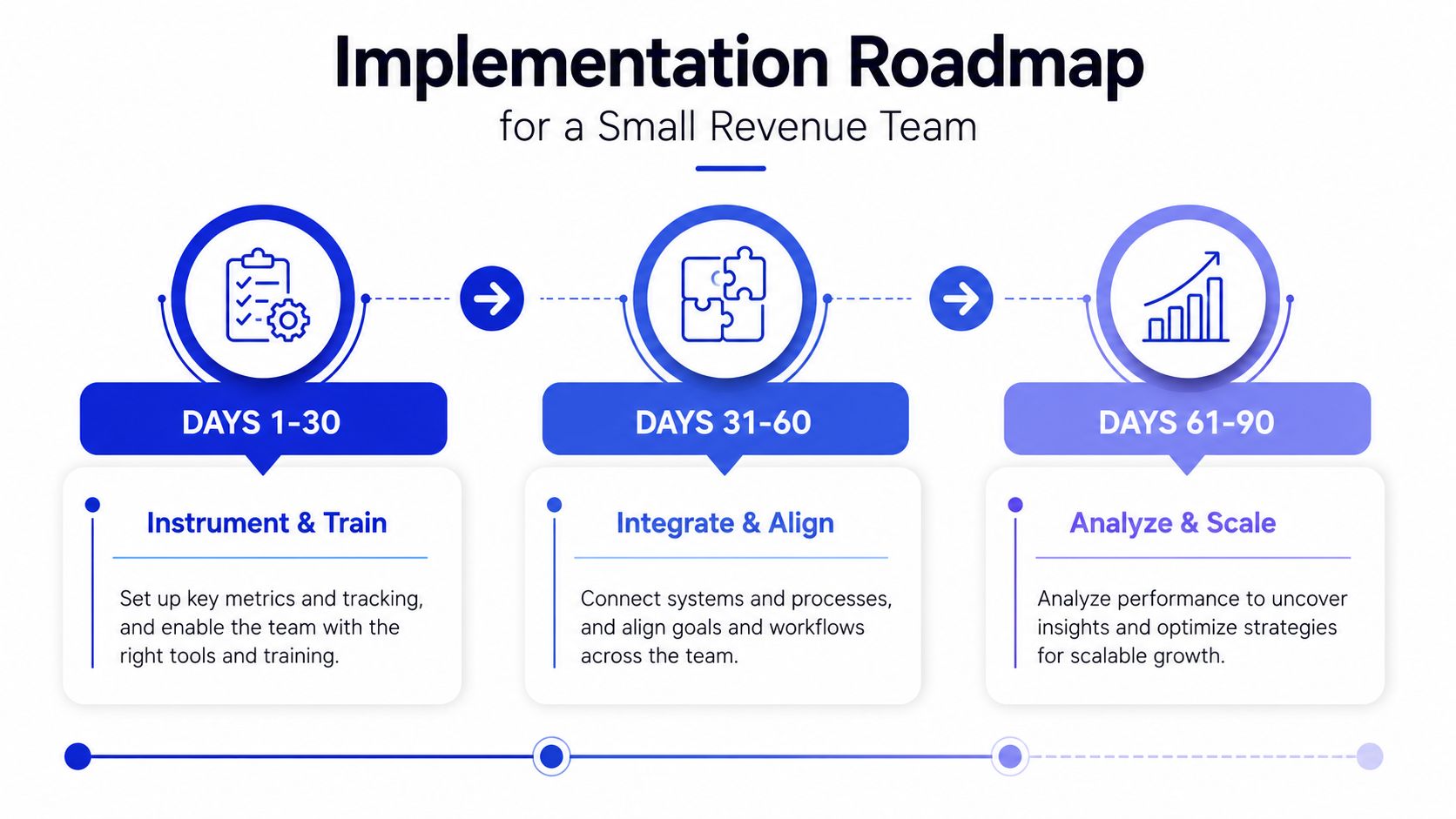
Days 1 to 30 focus on one job
Start with the highest-intent pages, the questions buyers ask most often, and the content already sitting on your site. Train the system on those materials first, then define what counts as a qualified conversation. That gives you a narrow, testable use case instead of a messy company-wide launch.
The first real milestone is simple. A buyer asks a question that would normally wait until business hours, and the system handles it cleanly. If that interaction feels off-brand or incomplete, fix the setup before you add more content or more workflows.
Days 31 to 60 connect the handoff
Once the first flow works, tie it to your CRM and set escalation rules. The goal is not to automate everything. The goal is to make sure the right person gets the right context when a human needs to step in. That is where teams find out whether the system improves the buyer experience or just deflects the question.
At this stage, start the coaching loop too. Managers need to see whether conversations were qualified correctly, whether the summary was useful, and whether the handoff saved time. If it did not, the problem is usually in the routing logic, not the interface. For teams that want a focused rollout path, how a dedicated AI agent fits into a small revenue stack is a useful reference point for keeping the first deployment tight.
Days 61 to 90 expand with restraint
Only after the first two stages work should you expand into playbooks, training reinforcement, and a content refresh cadence. That order matters because teams often add more content before they have proved that the existing content is being used well.
For teams tracking operational readiness, ramp time benchmarks for 2026 can help frame internal expectations, but do not let benchmarks distract you from your own workflow. A platform is useful when reps trust it in live situations, and when buyers get faster answers without having to repeat themselves. For agencies comparing tools, find the right SEO tool for agencies is a useful reminder that focused tooling often beats broad tooling when the workflow is narrow.
When a Focused AI Agent Beats an All-in-One Suite
For many SMBs, agencies, and early-stage SaaS teams, a focused AI agent layer is the better purchase. If the problem is fast answers, clean qualification, and a solid handoff to a human, a giant suite adds more than it solves. Buy the narrowest system that improves the buyer experience.
That lighter path is practical. It can handle content, conversational AI, and basic analytics without forcing you to hire a platform admin. A focused agent can live on high-intent pages, answer product questions, qualify leads, and pass along a useful summary when a rep needs to step in. That is usually enough until the team grows into a bigger stack.
Where the lightweight path wins
A smaller stack wins when the team is short on time, the buyer journey is simple, or slow first response is the main leak. It also wins when workflow sprawl is already a problem. Fewer tools mean fewer logins, fewer training sessions, and fewer half-used modules that never become part of daily work.
For agencies comparing tools, find the right SEO tool for agencies is a useful reminder that narrow tools often beat broad suites when the workflow is specific. The same logic applies here. Focused systems usually get better adoption because they match one job instead of trying to cover every job poorly.
Where a full suite still makes sense
A full suite earns its place when content governance, coaching, analytics, and CRM orchestration all matter at once. If you have multiple managers, multiple product lines, or a messy handoff chain, the all-in-one platform can justify itself. The issue is not that bigger platforms are bad. It is that many teams buy them before they have outgrown a sharper stack.
Chatgrow fits that lighter path as one option. It creates custom support agents trained on site content, pricing, FAQs, and product pages, with 24/7 answering, smart escalation, and CRM field writing for handoff. It is built for teams that want lead qualification and support coverage without standing up a broader enablement suite, and its predictable $39/month starting plan lowers the risk of trying the smaller stack first. If you want a clearer picture of where a focused agent layer fits, how a dedicated AI agent fits into a small revenue stack is a useful reference point.
KPIs to Track and the One-Week Decision Framework
Ignore most platform marketing and track four things only. First-response latency, qualified-conversation rate, content-to-deal attribution, and ramp time tell you whether the system is helping the buyer and the business. Anything else is secondary until these four move in the right direction.
A useful benchmark source is ramp time benchmarks for 2026. Use it as a reference point, not a substitute for your own process. Benchmarks matter less than whether your team is getting faster, cleaner, and more consistent after the rollout.
The decision should take one week
Day 1, map buyer friction. Find the pages, questions, and handoffs where buyers stall. Day 3, shortlist vendors with the buyer-experience scorecard above. Day 5, run a paid pilot on one high-intent page. Day 7, decide based on the four KPIs, not on demo polish.
That sequence keeps you honest. If a vendor can't show meaningful movement in a pilot, the full deployment will probably not save it.
Track the signals that matter
Use a simple internal dashboard.
First-response latency, how quickly a buyer gets a useful answer.
Qualified-conversation rate, how many interactions are worth human follow-up.
Content-to-deal attribution, whether shared content contributes to deal movement.
Ramp time, how quickly new reps become useful in the field.
The point isn't to worship metrics. It's to keep you from buying a feature-rich platform that looks good in a review and disappears in practice. If the buyer experience improves, the numbers will usually follow.
If you're choosing a sales enablement platform in 2026, start with the buyer's path, not the vendor's feature list. Shortlist one heavyweight platform only if your team can operationalize it, otherwise test a focused AI agent layer first and see whether it clears friction faster. If you want a simple place to start, review your highest-intent pages this week and book a trial with Chatgrow so you can see whether a leaner system handles the buyer handoff better than a bigger suite.
Related Posts
Continue Reading
More articles from the ChatGrow Team.