
Blog
Social Media Customer Service: From Cost to Conversion
By
Nelson Uzenabor

A customer posts on X about a billing problem. Nobody answers for hours. Other prospects see the thread, assume support is weak, and move on. That is the significant cost of poor social media customer service. It isn't just one unresolved issue. It's lost trust in public.
For small businesses, social channels now function like the front desk, support inbox, and reputation board at the same time. Customers ask pre-sale questions there. They complain there. They compare your responsiveness to every other brand they interact with there. If you treat social as “just marketing,” service gaps turn into revenue leaks.
Handled well, social media customer service does more than reduce complaints. It helps qualify buyers, recover shaky deals, answer objections before checkout, and show future customers how your team behaves under pressure. That's why smart operators don't separate support from growth. They connect them.
The practical challenge is capacity. Most SMBs don't have a large support team, a dedicated social care manager, and an operations analyst. They have a few people wearing several hats. That's exactly why process matters, and why automation matters when it's used with restraint. If your current setup feels reactive, scattered, or impossible to measure, start with a stronger foundation for digital customer service and build social support into it instead of treating it as a side task.
Table of Contents
Introduction The New Front Door of Your Business
Social media customer service used to be treated as a reactive function. A comment came in, someone on the marketing team replied when they had time, and that was enough. It isn't enough now. Customers use social channels to ask shipping questions, challenge invoices, request refunds, and test whether your company is responsive before they buy.
That changes the operating model for SMBs. The same Instagram DM can be a support ticket, a sales conversation, or an early churn warning. The same public Facebook comment can either reinforce trust or damage it in front of everyone browsing your page. If your team handles those interactions casually, you're leaving customer experience to chance.
Why this channel carries more weight than email
Email is private. Social is visible. When a prospect reads how you respond to frustration, delays, or confusion, they're learning how you'll treat them after the sale. That's why social support shapes brand perception faster than most owners expect.
Social support is one of the few business functions that can solve a problem and market your brand in the same interaction.
For SMBs, that visibility is an advantage if you build a workable system. You don't need enterprise tooling to start. You need clear ownership, fast triage, response standards, and a way to move complex issues into the right hands without losing context.
What good social service looks like in practice
A strong social media customer service program does a few things well:
Catches every inquiry: No comment, mention, or DM gets buried.
Sorts conversations quickly: Sales questions, support issues, and public complaints don't sit in one messy stream.
Uses public replies strategically: The team acknowledges the issue in public, then moves account-specific details to private messages.
Protects team time: Repetitive questions get handled consistently so people can focus on exceptions.
Feeds the business: Product complaints go back to operations. Buying questions go to sales. Patterns go to leadership.
That's where the ROI starts. Not in “being present,” but in building a system that turns public interactions into retained customers, qualified leads, and better decisions.
Why Social Customer Service Is a Growth Engine for SMBs
Small businesses that answer social questions well do more than close tickets. They protect conversion, recover at-risk customers, and surface buying intent in real time.
The speed gap is real. 42% of customers expect a response within 60 minutes or less, and the average global response rate across all sectors is only 34%, according to Hootsuite's social media customer service benchmark. For an SMB, that gap is an opening. A timely reply can win trust before a larger competitor even notices the message.

Public support influences revenue before and after the sale
A visible service interaction does two jobs at once. It helps the current customer, and it gives future buyers evidence that your business responds under pressure.
That matters for SMBs because trust is often the ultimate sale. Prospects may like your product and still hesitate if they are unsure what happens after payment. A clear public reply reduces that uncertainty faster than another promotional post.
Handled well, social support can:
Reduce drop-off during evaluation: Buyers often ask about shipping, returns, setup, compatibility, or availability right before they decide.
Recover revenue at risk: A delayed order or billing issue can turn into a refund, chargeback, or lost repeat purchase if nobody responds.
Strengthen close rates from inbound interest: Social questions often come from people already comparing options.
Improve retention: Customers stay longer when they know they can reach a real person without friction.
A support queue often contains sales signals
Owners miss this all the time. They count complaints and overlook commercial intent.
A comment asking, “Does this work with QuickBooks?” is not just a support message. It is a qualification moment. The same goes for DMs about delivery timelines, plan limits, custom options, appointment availability, or whether a product fits a specific use case. If your team treats every incoming message as generic service work, potential revenue sits in the same pile as routine admin.
The fix is operational, not expensive. Tag messages by intent. Route pre-sale questions to someone who can answer clearly and ask one useful follow-up. If the volume is high, use AI to identify likely sales conversations, suggest replies, and collect basic qualification details before a staff member steps in.
That is how social service starts paying for itself.
SMBs can beat larger competitors on speed and relevance
Big brands usually have more staff. They also have more layers, more handoffs, and more delay. Small businesses can win with a tighter system.
The goal is not to be everywhere or answer everything instantly. The goal is to respond fast on the channels that matter, separate simple questions from sensitive issues, and make sure high-intent conversations do not die in the inbox.
For most SMBs, that means:
Cover the channels you can monitor. Unwatched accounts create more damage than a smaller channel mix.
Set a first-response target. Even a short acknowledgment protects trust while the full answer is being worked.
Identify lead-worthy conversations early. Questions about fit, pricing, timing, stock, onboarding, or implementation should be flagged.
Use AI where repetition is draining team time. Good automation handles FAQs, triage, and after-hours capture so staff can focus on exceptions and revenue moments.
Social customer service becomes a growth engine when support, sales, and operations share the same signals. That is a practical advantage for SMBs. It does not require an enterprise budget. It requires a disciplined workflow and the judgment to know which conversations deserve a human reply now.
Mastering the Platforms Where Your Customers Live
Every platform trains customers to expect a different kind of response. That's why a copy-paste support strategy fails. What works on Facebook can feel slow on X. What feels helpful on LinkedIn can read as stiff on Instagram. If your team answers everywhere in the same way, customers notice.
A better approach is to decide where each channel fits in your service stack. If your team needs a broader operating model for multi-channel support, social should sit inside it with clear channel-specific rules.
Match the platform to the job
Some networks are built for speed. Others are better for discussion, reassurance, or relationship maintenance.
Platform | Primary Use Case | Expected Response Speed | Best For |
|---|---|---|---|
X | Public issue acknowledgment and rapid triage | Fast | Outages, complaints, brand mentions, urgent visibility |
Comment management and direct support conversations | Moderate to fast | Local businesses, service follow-up, community-heavy brands | |
DM support and visual product questions | Fast for DMs, moderate for comments | E-commerce, consumer brands, order and product questions | |
Professional reputation and B2B support touchpoints | Moderate | SaaS, agencies, partnerships, account-level credibility |
X is best when issues are public and time-sensitive. Customers use it to apply pressure, report service breakdowns, or ask blunt questions in public. Teams should acknowledge quickly, then move account-specific details to DM.
Facebook remains useful for businesses that get questions in comments, Messenger, and local community threads. Customers often expect more explanation there, not just a short acknowledgment.
Instagram works best for product-led brands. Buyers ask about sizing, availability, shipping, setup, and returns in DMs and comment threads. If you sell visually, Instagram support often sits close to conversion.
LinkedIn is different. The volume is usually lower, but the stakes can be higher for B2B. A sloppy reply can affect how prospects, partners, and future hires read your company.
Keep one voice but change the format
Your brand voice should be consistent across platforms, but the delivery should change.
Here's what that looks like in practice:
On X: Keep replies concise, calm, and direct. Don't over-explain in public.
On Facebook: Add enough detail to show you're taking ownership.
On Instagram: Sound human and helpful. Shorter messages usually work better.
On LinkedIn: Stay professional without sounding legalistic or cold.
If a platform rewards speed, optimize for acknowledgment first. If it rewards context, optimize for clarity first.
Where SMBs usually overextend
The common mistake is trying to “support everywhere” from day one. That creates patchy coverage and missed messages. A smaller business should focus on the channels that already produce service volume, buying questions, or public reputation risk.
Use a simple prioritization filter:
Where do customers already message you?
Where do complaints become visible fastest?
Where do pre-sale questions appear before purchase?
Which channel can your current team monitor daily without fail?
If you can answer those truthfully, you'll know where to invest first.
Brand voice rules your team can actually follow
Tone guidelines don't need to be a brand book. They need to be usable during a busy day.
A practical support voice usually includes these rules:
Acknowledge first: Start by recognizing the issue, not defending the company.
Use plain language: Customers want answers, not internal terminology.
Sound like a person: Formal doesn't mean robotic.
Stay specific: Tell the customer what happens next.
Don't improvise policy: If refunds, billing, or account terms are involved, use approved wording.
That last point matters. Friendly language builds trust. Inconsistent policy creates bigger problems than a stiff tone ever will.
Essential Metrics and Team Best Practices
Teams often overcomplicate measurement. You don't need a long KPI dashboard to improve social media customer service. You need a short list of numbers and habits that change behavior.

Start with service metrics you can actually manage
For most SMBs, these are the core metrics:
First response time: How long it takes for someone to acknowledge the customer.
Resolution time: How long it takes to fully solve the issue.
Reply coverage: Whether every relevant comment, mention, and DM gets a response.
CSAT: A simple post-resolution satisfaction check if your tools allow it.
Escalation volume: How often front-line staff need help from another person or team.
The most important early metric is first response time. It shows whether your team is available enough and organized enough to meet customer expectations. Resolution time matters too, but it's often influenced by shipping, billing, or engineering dependencies outside the social team's control.
Build a basic SLA without making it bureaucratic
A social service SLA should answer three questions:
Who responds first?
How quickly should they acknowledge the issue?
When does the conversation move to a different person or channel?
For a small team, that can be as simple as a shared rule set in your workspace:
Public complaints: Acknowledge promptly and invite DM if account details are needed.
Pre-sale questions: Route to the person who can answer accurately and fast.
Billing or account issues: Move private as soon as sensitive information is required.
Abuse or spam: Document and moderate according to policy.
Don't over-design this. If your SLA isn't easy to remember, the team won't follow it under pressure.
A good SLA reduces hesitation. It tells the team what to do before they start debating edge cases.
Build a team rhythm that prevents dropped conversations
Process matters more than scripting. Small businesses usually lose social inquiries because nobody owns the queue at a given moment, not because nobody knows how to write a kind response.
Use a lightweight operating rhythm:
Morning review: Check unresolved messages, overnight comments, and open escalations.
Midday sweep: Clear backlog and tag anything that needs another department.
End-of-day handoff: Note unresolved issues so nothing disappears overnight.
If your social volume is low, one person can do this. If volume is growing, assign primary and backup ownership. Someone always needs to know they're on first-reply duty.
Best practices that hold up under pressure
Training should focus on live judgment, not ideal scenarios. Teach your team how to recognize when to stay public, when to go private, and when to escalate.
A workable checklist looks like this:
Stay public when the answer is general and useful to others.
Go private when the customer must share order details, email, billing info, or account history.
Escalate when the issue touches refunds, legal risk, service outages, or an emotionally charged complaint.
Close the loop publicly when a public complaint has been resolved privately and a brief follow-up reassures others.
The best agents don't try to “win” the interaction. They reduce friction, protect the customer relationship, and keep the next step obvious.
Integrating AI to Scale Support Without Losing the Human Touch
For a small business, the first AI win in social support is usually simple math. If your team answers the same 20 questions every week across Instagram, Facebook, and direct messages, those hours are being spent on work a system can handle faster and more consistently.
AI earns its place when it reduces response load and improves conversion paths at the same time. It can answer routine service questions, collect the details your team needs, and identify which conversations carry buying intent so a person can step in at the right moment.

If you're assessing where automation fits inside AI customer support for growing teams, start with three decisions. Which questions should AI answer on its own? Which details should it collect before handoff? Which conversations should go straight to a human because the revenue risk or emotional stakes are too high?
Put AI on the work that is repetitive and commercially useful
Good starting points are narrow, frequent, and easy to verify. Shipping policies, return windows, store hours, product compatibility, appointment availability, onboarding steps, and order-status requests are all strong candidates.
The bigger opportunity for SMBs is upstream. AI can sort a comment or DM into support, sales, or lead follow-up, then ask one or two qualification questions before your team joins. That turns social service into a front-end sales filter instead of a queue that only absorbs cost.
Useful AI tasks include:
FAQ responses: Policies, availability, delivery, setup basics, account questions.
Intent detection: Separate support issues from pre-sale questions and partner inquiries.
Lead qualification: Capture budget, use case, urgency, product fit, and contact details.
After-hours response: Acknowledge the message, collect context, and tee up the next step for the team.
That only works if the system has limits. Weak knowledge sources, vague prompts, or no escalation rules create bad answers fast, and bad answers are expensive.
Build the human handoff before you expand automation
The handoff is where many teams lose the ROI. A customer explains the issue to AI, gets transferred, and then has to repeat everything to a person. Support time goes up, frustration goes up, and the customer is less likely to buy again.
Adobe notes in its social media customer service guide that social complaints often escalate to human agents, but prior AI interactions are not consistently passed along in a structured way. That is the gap to fix first.
A useful handoff summary should give the agent enough context to act immediately:
Intent: Refund request, product question, order issue, cancellation risk, or pre-sale inquiry
Sentiment: Calm, confused, frustrated, urgent
Known facts: Product, order number, channel, account status, timeline
What AI already did: Questions asked, answers provided, links shared, data collected
Reason for transfer: Policy exception, emotional complaint, deal risk, billing issue, or low confidence answer
If the human agent still has to ask the customer to restate the problem from scratch, the automation is creating work instead of removing it.
Keep people visible where judgment affects retention and revenue
Customers will accept automation for simple tasks. They will not accept getting trapped in it. Make the path to a person obvious for cancellations, damaged orders, billing disputes, account access problems, and any conversation with strong frustration.
This matters for sales too. A buyer asking, “Will this work for a three-person team?” should not be buried in a generic support flow. That is a revenue conversation. Route it to someone who can answer the question and help close the deal.
This walkthrough shows the kind of AI-assisted service flow many teams aim for:
The practical goal is clear. Let AI handle repetitive volume, collect useful context, and surface purchase intent. Keep your team focused on exceptions, recovery moments, and conversations where human judgment protects revenue or creates it.
Measuring What Matters and Connecting Support to Revenue
Reply speed and resolution time matter, but they do not tell you whether social support is helping the business grow. For an SMB, that gap matters. If your team is answering questions on Instagram, Facebook, or X, you already have a stream of buying signals, churn warnings, and expansion opportunities in front of you.
Zendesk reports that 54% of brands using social customer service see increased customer lifetime value, while only 12% track social-driven conversions or qualified leads, according to Zendesk's guide to customer service through social media. That is the missed opportunity. Many owners fund social support as overhead and never set it up to show commercial impact.
The practical fix is simple. Treat service conversations as a source of revenue signals, not just tickets to close.
Track revenue signals inside service conversations
Some social messages are routine support. Others sit one step away from a sale or a save. If you do not tag them, they disappear into the same bucket as delivery updates and password resets.
Start with a short tagging system your team will use:
Pre-sale product question
Pricing clarification
Implementation or setup concern
Renewal risk
Upsell opportunity
Cart or checkout hesitation
Competitor comparison
These tags help in two ways. First, they show where service is influencing pipeline and retention. Second, they expose friction that hurts conversion, such as unclear pricing, weak onboarding content, or product pages that create confusion instead of confidence.
AI can help here without adding headcount. It can suggest tags, detect intent, and flag high-value conversations for human follow-up. That saves time, but the bigger return is better routing. A pre-sale question should not sit in the same queue as a shipping complaint.
Build a simple attribution model
Small teams do not need expensive software to connect social support to revenue. They need a clean process that survives a busy week.
Use this model:
Tag the conversation when a post, comment, or DM shows buying intent, churn risk, or expansion potential.
Add the contact to your CRM or customer record with the source channel and tag.
Log the outcome after follow-up, such as sale, no sale, retained account, expansion, or unresolved issue.
Review the results each month with whoever owns support, sales, and marketing.
That is enough to answer useful questions. Which channel produces qualified conversations? Which objections keep showing up before purchase? Which service issues put renewals at risk? Which agents are best at turning a support interaction into a sales assist?
One warning. Do not over-attribute. Social support often influences a sale instead of closing it directly. That still has value. If a fast, informed reply removes doubt and keeps a buyer in motion, support contributed to revenue even if the purchase happened later on your site or through a sales call.
Teams that only measure speed train agents to end conversations quickly. Teams that also measure commercial outcomes train agents to resolve issues, spot intent, and protect revenue.
What owners should ask every month
A simple monthly review usually beats a polished dashboard that nobody checks.
Ask:
Which social conversations showed clear purchase intent?
Which recurring questions exposed conversion blockers?
Which complaints pointed to churn or cancellation risk?
Which public resolutions helped protect trust and future sales?
Which conversations should have moved to sales or retention faster?
Social customer service starts paying for itself. You are not just reducing response burden; you are using support to recover at-risk revenue, qualify leads earlier, and give sales and marketing better feedback on what customers need.
Your 30-Day Social Customer Service Roadmap
Most SMBs don't need a major rollout. They need one month of focused cleanup and a simple operating rhythm they can sustain.
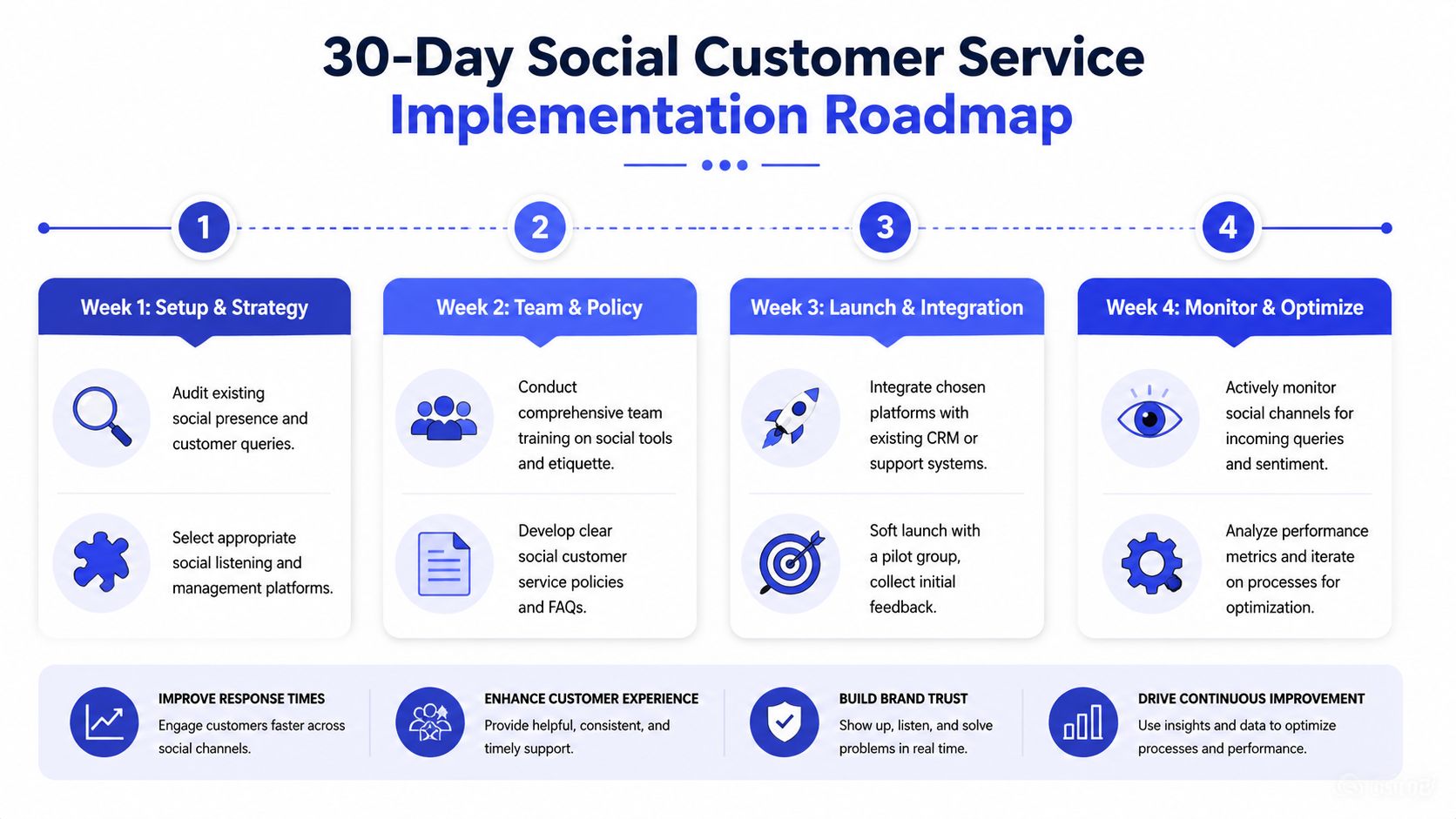
Week 1 and Week 2
Week 1. Audit your current channels. List every platform where customers comment, mention, or message your business. Pick the primary channels you can reliably monitor. Document your common inquiry types and note which ones are pre-sale, support, or reputation-sensitive.
Week 2. Set service rules. Define who owns first reply coverage, when conversations move to private messages, and what counts as an escalation. Build response templates for your top FAQ categories, but keep them editable so agents can sound human.
Week 3 and Week 4
Week 3. Add automation carefully. Deploy a simple AI layer for repetitive questions and initial triage. Make sure it can collect context before handoff and route leads or complaints properly.
Week 4. Start measuring outcomes. Track first response time, reply coverage, unresolved escalations, and commercial signals such as pre-sale product questions or conversion-related inquiries. Review the patterns with whoever owns support, sales, and operations.
Keep it lean. If your process gets more complex than your team can follow, simplify it again.
If you want to turn social conversations into both faster support and better lead qualification, Chatgrow gives SMBs a practical way to do it. You can train an AI agent on your site, FAQs, pricing, and product pages, deploy it quickly, and use smart escalation to pass qualified context to your team instead of forcing customers to repeat themselves.
Related Posts
Continue Reading
More articles from the ChatGrow Team.


