
Blog
Telephone and Intercom Systems: The Complete Business Guide
By
Nelson Uzenabor

You've got a front desk that misses calls when the phone rings twice, a buzzer panel that only works when someone remembers the right apartment code, and a back office that's tired of chasing delivery drivers to the loading dock. That's not a “communications problem,” it's an infrastructure problem. Telephone and intercom systems either keep a building moving or make every day harder.
The bad news is that most buying guides focus on shiny features and ignore the stuff that decides whether the system works in your building. The good news is that the right answer is usually simpler than vendors make it sound. If your priority is customer response, internal access, or basic reliability in an older property, the right setup comes down to wiring, power, and how much complexity your team can realistically support. For a broader service view, it also helps to think about how voice support fits into the rest of your customer experience, not just a handset on a wall, as shown in Chatgrow's omnichannel customer service guide.
Table of Contents
Why Your Communication Infrastructure Matters More Than You Think
The Infrastructure Realities That Determine System Performance
Integrating Communication Systems with Modern Business Tools
Why Your Communication Infrastructure Matters More Than You Think
A growing business often notices the problem too late. The receptionist is juggling a mobile phone, a desktop line, and an entry buzzer that only sometimes releases the door on the first try. Meanwhile, a customer stands outside, a tenant waits at the entry panel, or a supplier gives up after the second unanswered ring.
That's where telephone and intercom systems stop being “office hardware” and start acting like core operations. If your team can't answer, route, or verify calls cleanly, every other process slows down. The owner ends up paying for it in lost time, duplicated work, and avoidable frustration.
Treat voice access like building infrastructure
People usually budget for internet and electricity because everyone understands the pain of failure. Voice and entry systems deserve the same mindset. A weak setup can be worse than no upgrade at all, because staff start relying on workarounds that break under pressure.
For SMB owners, the practical question isn't whether a newer platform exists. It's whether the system fits the building, the power situation, and the way people already work. If your staff only needs reliable internal calling and controlled entry, a leaner design often beats a feature-heavy platform that needs ongoing babysitting.
Practical rule: If the system adds confusion for staff, it's already costing you money, even before you count installation.
That's why buyers should look past brochures and think in terms of service continuity. A front-desk line, a warehouse entry point, and an apartment buzzer all carry different risks. The right system keeps the business moving when traffic is busy, staff are short-handed, or the internet is acting up.
Understanding How Telephone and Intercom Systems Work
A phone ringing at the front desk, a tenant pressing the entry panel, or a supplier waiting outside all depend on the same basic process. Voice gets turned into an electrical signal, moved to another point, then converted back into sound. The technology changes, but the operating logic stays the same.
From Bell's first transmission to networked voice
The first telephone systems proved that speech could travel over wires. Alexander Graham Bell received U.S. patent 161,739 on 6 April 1875, filed the patent application on 14 February 1876, and made the first successful clear-speech transmission on 10 March 1876 with, “Mr. Watson, come here, I want to see you.” Commercial use followed fast, with the first experimental telephone exchange in Boston in 1877 and the first commercial U.S. exchange in New Haven on 28 January 1878. The first commercial toll line began service on 15 June 1878 between Springfield and Holyoke, Massachusetts. telephone history milestones
Those early steps solved the problem. A single handset is a device. A network of exchanges is infrastructure. Once the network existed, distance became the engineering challenge, and Bell's 10 August 1876 call between Brantford and Paris, Ontario, showed how far the idea could reach. The first transcontinental U.S. call on 25 January 1915 pushed that further, covering 3,600 miles from New York City to San Francisco and using a newly invented vacuum-tube amplifier.
How intercoms grew out of the same idea
Intercoms used the same voice principle and brought it inside a building. Early systems relied on a buzzer to alert residents, then moved to direct two-way conversation through earpieces and mouthpieces. By the 1950s, apartment buzzer systems let residents remotely grant entry, which turned intercoms into a security and convenience tool rather than just an annunciation device. intercom history overview
That split still defines the category. Some systems only need internal calling. Others combine communication with access control, visitor management, or door release. If you understand that distinction, you can choose an architecture that fits the building instead of paying for features your staff will never use.
Retrofits matter here. Many SMBs already have telephone wiring in the walls, and that can lower installation cost if the existing cabling is in good shape. It can also become a trap if the wiring is degraded, poorly labeled, or incompatible with the system you want to run. If your building has unstable power, the design has to account for that up front, because an elegant interface is useless when the entry panel dies during an outage.
For business buyers comparing options, it makes sense to compare VoIP phone providers against the wiring, power backup, and call-handling needs you have. That is the decision point. A simpler system that works on your existing infrastructure will usually beat a more advanced setup that needs constant troubleshooting.
Comparing Analog, Digital, VoIP, and IP Intercom Systems
The market usually gets described as if “modern” automatically means “better.” That's a mistake. The right system depends on where the building is, what wiring is already installed, and how much downtime your business can tolerate.
What each type is good at
Analog systems are the old reliable option. They're straightforward, usually easier to understand, and can be a good fit where the building already has legacy wiring and the team wants basic voice without network dependence.
Digital PBX systems sit in the middle. They offer more control and cleaner switching than old analog arrangements, but they still feel like a dedicated phone system rather than a software platform.
VoIP platforms move calls over data networks. That makes them flexible for branches, remote staff, and centralized call handling, but they also depend on network quality and power planning.
IP intercoms extend the same logic to building entry and internal communication. They're useful where owners want remote management, integrated access control, or richer visitor workflows.
If your building can't support reliable data service or clean power, a feature-rich IP system won't save you. It'll just fail in a more expensive way.
For shoppers comparing business phone options, it's smart to compare VoIP phone providers against your actual infrastructure, not against a marketing checklist.
Telephone and Intercom System Types Compared
System Type | Best For | Installation Complexity | Ongoing Costs | Power Resilience | Scalability |
|---|---|---|---|---|---|
Analog | Older buildings, basic voice, simple internal use | Lower when existing wiring is usable | Usually lower complexity, but depends on legacy support | Strong when designed for local operation | Limited compared with IP-based setups |
Digital PBX | Organizations that want a controlled phone system | Moderate | Moderate | Better than pure software dependence | Good for structured office growth |
VoIP | Multi-site offices, remote teams, centralized call handling | Moderate to higher | Often tied to service and network support | Depends heavily on internet and backup power | Strong if the network is planned well |
IP Intercom | Buildings needing access control, remote entry, and unified communication | Moderate to higher | Depends on endpoints and management needs | Depends on network and PoE planning | Strong for modern buildings and campuses |
Where older systems still make sense
Analog isn't dead, and that matters for SMBs. If your building already has functioning cabling, your priorities are basic calling and resilience, and your staff doesn't need remote software controls, analog can still be the sensible choice. It's not glamorous, but it can be dependable.
IP-based systems are the better answer when management wants centralized control, remote release, or integration with other tools. They're also easier to extend across locations. Just don't pretend they're “plug and play.” They're networked systems, which means they inherit the strengths and weaknesses of the network underneath them.
The Infrastructure Realities That Determine System Performance
Most buyers get burned here. A system can look great on paper and still perform badly because the building's wiring, power quality, or switch setup wasn't ready for it. The hardware isn't the whole story; the infrastructure is.
Retrofitting over existing wiring
Older buildings often already have telephone wiring in place, and that can be a useful starting point for retrofits. Some intercom approaches can use existing telephone infrastructure for room-to-room calling, which is exactly why they're attractive in cost-sensitive properties. The hard part is not “can it be done?” but “can it be done cleanly without creating a maintenance headache?” retrofit intercom wiring
That's where many projects go sideways. Different handsets may not behave the same way, traffic to the public line needs to be isolated properly, and the wiring topology has to match the system's design. If those details aren't checked before purchase, the installer ends up solving a building problem with product substitutions, which is the expensive way to do it.
Analog electrical constraints you can't ignore
Analog intercoms live or die on electrical loading. Dynamic microphones are typically specified around 150 to 500 ohms, electret microphones around 1,000 to 2,000 ohms, and each station's bridging impedance should be 10,000 ohms or greater to avoid excessive line loading and preserve speech level across a shared party line. Standard interconnect cabling is commonly 22 AWG shielded cable, which reflects the need to balance low loop resistance with noise rejection over building runs. analog intercom engineering
Those are not abstract lab numbers. If the line loading is wrong, people hear weak audio, crosstalk, or uneven volume across stations. In practical terms, that means your cheapest fix can become the most expensive support problem.
IP systems shift the problem, they don't remove it
Digital and IP systems move audio as packets over Ethernet, often with PoE so data and power travel on one cable. That simplifies deployment, but it also creates new planning tasks. Network latency, switch capacity, and endpoint power draw all matter, and some IP intercom lines report IEEE 802.3af support with 40 W rated / 50 W max power consumption on the CE version, which shows how real PoE budget planning is in large installs. intercom architecture overview
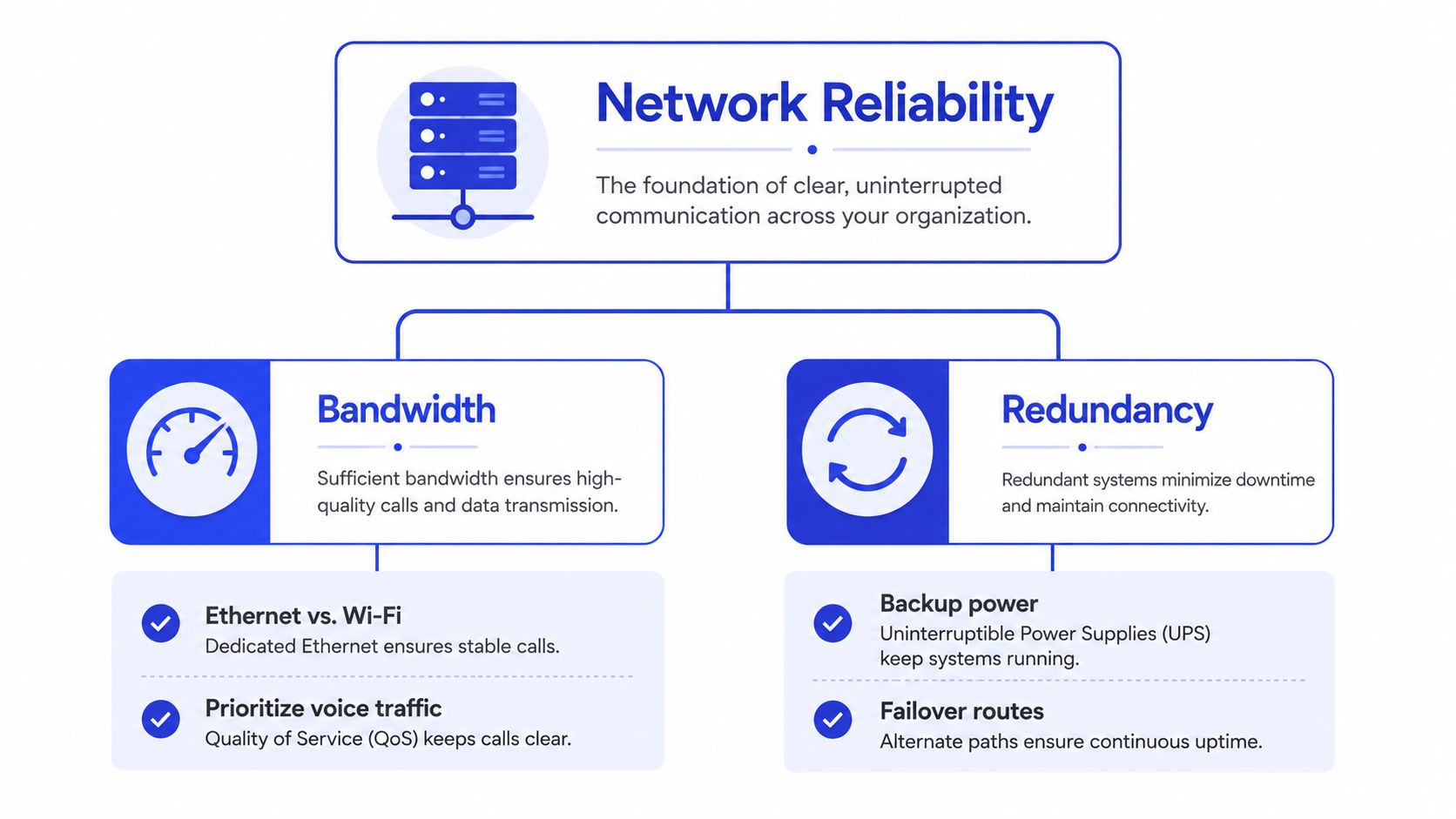
Bandwidth matters, but so does redundancy. If voice traffic shares a congested network with everything else, call quality drops. If the switch powering the entry panel isn't backed up, the system can fail exactly when someone needs it most.
How to Choose the Right System for Your Business
Don't start with product names. Start with the building, the staff, and the failure mode you can least afford. A small office, a retail site, a warehouse, and a multi-tenant property do not need the same answer.
Use case first, features second
If your main job is customer support, choose the system that keeps calls moving and makes routing easy. If your main job is internal communication, prioritize quick access and simple endpoint management. If you operate across multiple sites, centralized control matters more than fancy handset features.
A practical way to narrow it down is to ask these questions:
Do we need internal calling only, or do we also need controlled entry? Entry control pushes you toward intercom or video-enabled systems.
Does the building already have usable wiring? If yes, retrofitting may save a lot of disruption.
Is internet or power stability a problem? If yes, avoid architectures that collapse when the network does.
Will staff use advanced features? If not, don't buy them.
For businesses evaluating entry systems, a resource like compare business video intercoms is useful when you're deciding whether visual verification is worth the added complexity.
Match the system to the building type
A modern office with stable internet can usually support VoIP or IP intercoms without drama, as long as the network is planned properly. An older property with workable telephone wiring may be better served by a retrofit path that avoids tearing up walls. A warehouse or industrial site often needs something rugged and predictable, not a feature stack that nobody will maintain.
If you're running a multi-tenant property, access control and visitor handling usually matter more than call aesthetics. If you're in a location with unreliable connectivity or power, reliability beats convenience every time.
For customer-facing teams, internal documentation matters too. A business customer service software guide can help you think through how voice, routing, and support workflows connect before you change the phone system.
Buy for continuity, not just features
A smarter approach is often to start with the simplest system that meets the need, then upgrade only when the pain is real. That avoids paying for idle features and reduces training overhead. It also keeps your team from depending on a platform they don't understand.
Clear recommendation: If your environment is unstable, pick the most resilient workable system, not the most impressive one.
Integrating Communication Systems with Modern Business Tools
A phone system used to be a dead-end device. Now it can sit at the center of customer operations if you connect it to the rest of your stack the right way. That matters most in buildings where the wiring is already there, the power is uneven, and nobody wants a costly rip-and-replace.

Use the system as a routing layer
VoIP platforms handle call routing, voicemail-to-email, and mobile extensions well, which helps when staff move between desks, branches, and home offices. Missed calls drop, managers get better control over traffic, and front-line staff can hand off issues to specialists without losing the thread.
Retrofit matters here. If you already have usable telephone wiring, a good installer can often build around it instead of tearing open walls, which keeps deployment simpler and cheaper. If the building is old or the grid is unreliable, the design needs battery backup, sensible failover, and enough restraint to keep the system working after a power cut.
CRM integration is the next obvious step. When calls are logged automatically, your team gets a cleaner record of the customer relationship, and click-to-call becomes a real productivity gain instead of a gimmick. For a practical view of how customer records should connect to your phone stack, see our customer data integration guide.
AI agents and escalation fit naturally here
AI-powered customer service agents are best on repetitive work. They can answer common phone questions, qualify leads, and pass the right details to a human when the issue needs judgment. That keeps your best staff from spending the day repeating the same answers.
Keep the workflow simple. The system should collect the basics, route the call cleanly, and escalate with context. If you want a broader view of how unified communications fit into a business environment, the UK business communications guide is a solid reference point.
Keep integration practical
API access, security, and staff adoption usually decide whether the integration succeeds. If the setup adds a clumsy login flow or exposes data that should stay private, walk away. If staff need constant retraining to use it, the rollout will fail in practice even if the demo looks polished.
Keep the engineering boring. That means checking how the system behaves during outages, confirming what already-installed wiring can be reused, and making sure the tools fit the way your team works. For SMBs, the right choice is usually the simplest integration that delivers real call history and cleaner handoffs, not the one with the longest feature list.
Your Implementation Roadmap and Next Steps
Start with an audit, not a vendor meeting. Check the wiring, the power situation, the current handset behavior, and where staff struggle today. Then document which endpoints matter most, because the failure at the front desk is not the same as the failure at a side door or warehouse gate.
Get two or three qualified quotes, but ask the same questions every time. How will the system behave during a power interruption? Can it use what's already installed? What testing will happen before handoff? Those answers separate a real installer from a salesperson with a catalog.
After installation, train staff on the exact workflows they'll use, and test every endpoint before you sign off. Don't skip documentation. A system nobody can troubleshoot later becomes a recurring expense.
If your building is older or your power is unreliable, lead with resilience. If your building is modern and your team already works in the cloud, plan for integration and growth. Either way, don't chase features first. Solve the infrastructure problem first.
If you're ready to tighten up customer response, internal access, or building communication without overbuying, Chatgrow can help you turn every conversation into a cleaner workflow. Visit Chatgrow to see how an AI customer-service platform fits into a practical communications strategy and start building a setup that supports your business.
Related Posts
Continue Reading
More articles from the ChatGrow Team.