
Blog
How to Improve Customer Satisfaction: A 5-Step Playbook
By
Nelson Uzenabor

Your support inbox looks busy, your reviews are mixed, and your team keeps saying the same thing: customers are happy when they finally get help, but too many of them arrive frustrated.
That usually means the problem isn't effort. It's diagnosis.
Most businesses trying to learn how to improve customer satisfaction jump straight to tactics. They add a chatbot, rewrite a few canned replies, send a survey, and hope the score goes up. Sometimes it does. Often it doesn't, because they fixed the visible symptom instead of the underlying source of friction.
A better approach starts earlier. You trace where customers get stuck, where expectations break, and where your process creates unnecessary effort. Then you fix those points in order, measure what changed, and repeat. That's the difference between random service upgrades and a system that improves satisfaction and retention.
Table of Contents
Why Customer Satisfaction Is Your Most Valuable Metric
A lot of teams still treat customer satisfaction like a soft metric. It gets discussed in retrospectives, added to board slides, and then pushed behind acquisition, revenue, and pipeline. That's a mistake.
Customer satisfaction sits much closer to profit than many operators think. A widely cited Bain & Company estimate, referenced by Qualtrics, found that a 5% increase in customer retention can raise profits by 25% to 95% in some contexts, which is why strong satisfaction programs focus on reducing friction and resolving issues quickly rather than treating service as a nice extra (Qualtrics on measuring customer satisfaction).
That matters for SMBs because satisfaction is often the first visible signal that something operational is breaking. Customers usually don't describe the issue in internal terms. They don't say your handoff logic failed or your confirmation workflow has gaps. They say support felt confusing, checkout felt risky, or nobody followed up.
Satisfaction predicts what happens next
When customers trust your process, they come back with less hesitation. They ask fewer repetitive questions. They escalate less aggressively. Sales cycles feel smoother because the experience supports the promise.
When they don't, the opposite happens:
More repeat contacts: Customers ask again because the first answer didn't create confidence.
Higher service cost: Agents spend time clarifying preventable confusion instead of solving real issues.
Weaker retention: Customers disengage after a series of small disappointments, not one dramatic failure.
Practical rule: If customers keep asking "What happens next?" your satisfaction problem is already operational, not emotional.
Why this metric deserves executive attention
The strongest satisfaction programs aren't built around slogans like "put customers first." They're built around repeatable service quality. That means clear expectations, reliable answers, fast resolution when speed matters, and consistency across channels.
If you're serious about how to improve customer satisfaction, stop treating it as a lagging sentiment score. Treat it as a management system. The score matters, but the true value comes from identifying the process failures underneath it and fixing them before they turn into churn.
Find the Real Friction in Your Customer Journey
Teams often say things like "support is too slow" or "customers are confused." Those statements aren't wrong. They're just too broad to fix well.
The issue usually lives inside a specific moment. A customer submits a return request and gets no confirmation. A trial user asks a pricing question and gets a generic answer. A buyer reaches checkout on Saturday and can't get reassurance from a real person. If you don't isolate the moment, you won't isolate the driver.
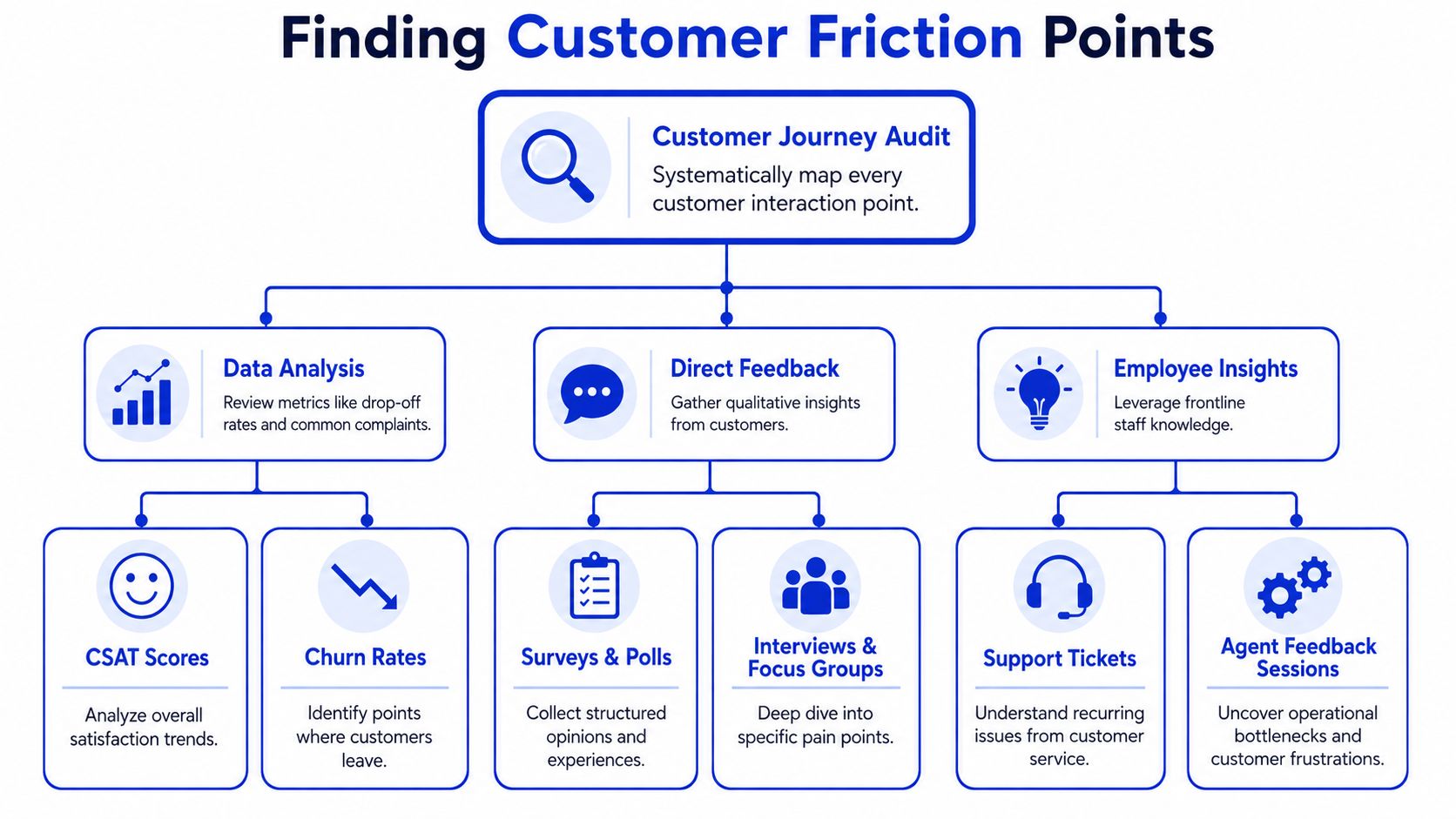
B2B International recommends starting with the drivers behind current CSAT and NPS, then prioritizing the highest-friction journeys. Their process is straightforward: identify satisfaction levels and what drives them, create workgroups to define tactics, secure executive approval, and use simple measures to verify improvement. The key point is to isolate specific drivers rather than reacting to general sentiment (B2B International on improving customer satisfaction).
Start with one journey, not the whole business
Don't map everything at once. Pick one journey that clearly matters to revenue or retention. For most SMBs, that's one of these:
Pre-purchase questions for high-intent visitors
Checkout and order confirmation
Onboarding and activation
Billing, renewal, or cancellation
Support for a recurring product issue
Walk that journey exactly like a customer would. Use the website, forms, email confirmations, chat widget, help center, and account area. Log where you hesitate, where language feels vague, and where the next step isn't obvious.
Combine customer language with behavior signals
A good diagnosis uses both what customers say and what they do.
Qualitative inputs usually reveal the actual frustration faster than dashboard summaries. Review support tickets, live chat transcripts, negative reviews, cancellation notes, and sales objections. You are looking for repeated phrases, not isolated complaints.
Behavioral signals help you rank those issues. Look for:
Drop-off points: Where people stop before completing a task
Repeated contact themes: Questions customers ask more than once
Escalation clusters: Interactions that start simple and still reach a human manager
Channel switching: Cases where a customer starts in self-service, then opens chat or email because the answer wasn't enough
Write friction statements that are specific enough to solve
Weak diagnosis sounds like this: customers are unhappy with support.
Useful diagnosis sounds like this:
Weekend order anxiety: Customers submit an order but don't know when they'll hear back.
Pricing ambiguity: Prospects can't tell which plan fits their use case.
Broken self-service path: Help articles exist, but they don't answer the exact task customers are trying to complete.
Escalation confusion: The bot answers part of the question, but the handoff to a human loses context.
That level of detail changes the fix. You stop debating whether to "improve support" and start changing the exact message, workflow, or handoff causing the issue.
The most expensive mistake is solving the problem that feels biggest internally instead of the one customers hit most often.
Prioritize by frequency, impact, and fixability
Once you have a list of friction points, don't rank them by who complained loudest in the last meeting. Rank them using three filters:
Filter | What to ask |
|---|---|
Frequency | How often does this issue appear across tickets, chats, reviews, or surveys? |
Impact | Does this affect conversion, onboarding, trust, or repeat purchase? |
Fixability | Can the team change this quickly with copy, routing, training, or workflow updates? |
This usually reveals a small set of high-impact issues. In many SMBs, a handful of repeat blockers create most of the visible dissatisfaction. Fix those first. Leave the edge cases for later.
Implement High-Impact Quick Wins Today
A customer places an order on Friday afternoon, gets a generic confirmation, and hears nothing until Monday. Support did not fail. The silence did.
That is why quick wins matter. Once you know the exact friction points, the fastest improvements usually come from tightening communication, removing uncertainty, and fixing broken handoffs. These changes do not require a large CX overhaul. They require discipline, clear ownership, and a bias toward issues customers feel immediately.
Contentsquare makes the same point in its guidance on reducing friction. Teams get better results when they fix blockers in the journey before adding more support layers or new channels (Contentsquare on customer satisfaction techniques).

Fix the moments customers notice immediately
In SMBs, the highest-return fixes are often small and visible. Customers do not score you on internal effort. They score you on whether the experience feels clear, reliable, and easy to complete.
Start with changes like these:
Rewrite high-traffic FAQ answers: If an article gets views and still drives tickets, the article is missing the direct answer, using internal terms, or forcing customers to interpret policy on their own.
Add confirmation and next-step messaging: After a purchase, form fill, booking, or support request, explain what was received, what happens next, who responds, and when.
Standardize common replies: Give agents approved responses for repeat questions, but write them to resolve the issue, not to close the ticket faster.
Clean up escalation paths: Customers should know when a case is being handed off, what context is included, and how long the next step usually takes.
These are simple fixes. They also expose trade-offs. Templates improve consistency, but weak templates spread bad answers faster. More status messages reduce inbound follow-up, but too many updates can feel noisy. The right test is whether the change lowers repeat contacts and confusion.
A simple before-and-after pattern
Before: a customer submits a demo request and sees, "Thanks, we'll be in touch."
After: the confirmation says the request was received, names the expected response window, explains what information the rep may ask for, and gives a path for urgent questions.
Before: a shopper asks whether a product works with a specific setup and gets a generic help-center link.
After: the team uses a short response template that answers the compatibility question directly, links to the exact guide, and flags edge cases for a human follow-up.
Customers can tolerate a wait. They react badly to ambiguity.
Live chat can help in these high-intent moments because it reduces the gap between a question and a decision. Used well, it catches hesitation during checkout, onboarding, and product evaluation. If you're deciding where it fits, this guide to the advantages of live chat for customer experience and conversion is a practical reference.
Train for clarity, not scripts
Teams often overcorrect here. They hear "consistency" and start scripting every response. That usually strips out judgment right where customers need it.
Train agents on a few repeatable behaviors instead:
Acknowledge the actual issue: Respond to the customer's situation, not just the ticket label.
Answer the first question first: Lead with the direct answer, then add policy or context.
State the next step clearly: Every reply should tell the customer what happens now.
Own the handoff: If another team needs to step in, the current agent should transfer context and explain the timeline.
I have seen this work especially well in smaller teams that do not have budget for major tooling changes yet. A better macro, a clearer confirmation email, or a cleaner escalation rule can cut avoidable contacts within days.
This video gives a practical overview of service habits that improve the customer experience without adding much process overhead.
Deploy Automation and AI Strategically
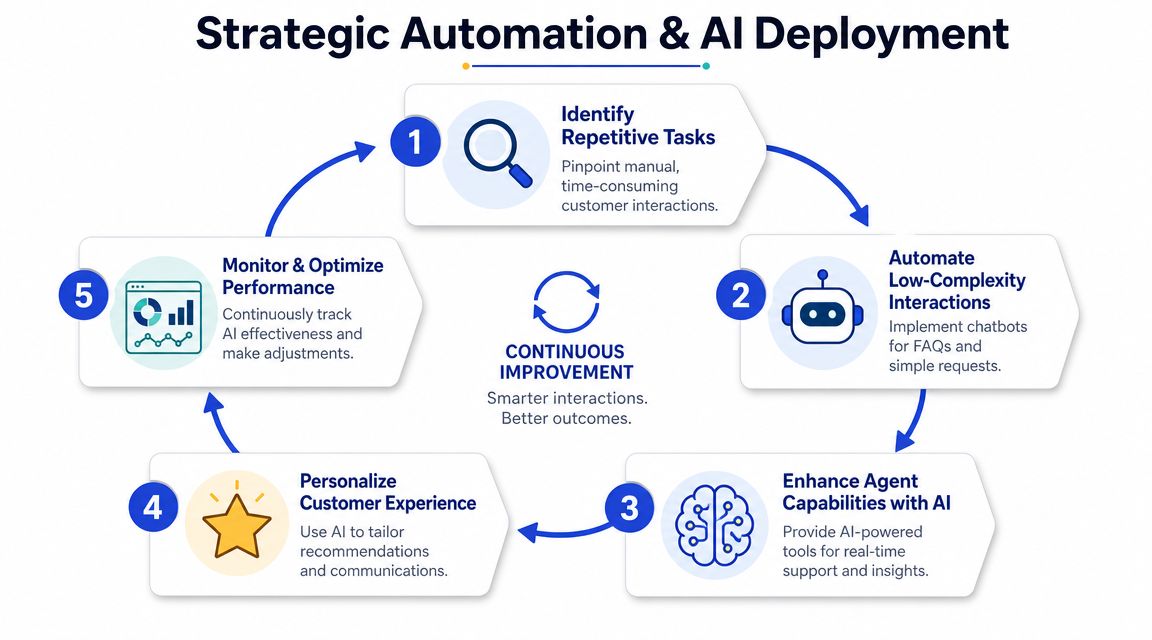
Automation helps when the problem is repetition, inconsistency, or availability. It hurts when teams use it to avoid fixing broken journeys.
That's the trade-off many businesses miss. They deploy a bot because response times feel slow, but the underlying problem is that customers keep asking the same unresolved questions. If the automation layer inherits weak content, vague policies, or bad escalation rules, customers just hit the same wall faster.
Recent guidance on AI-assisted service makes the priority clear: consistency and trust matter as much as speed, especially in always-on support. A 24/7 channel should deliver on-brand answers and clear escalation rather than just fast replies, because inconsistent responses and weak handoffs create new dissatisfaction (Contentstack on improving customer satisfaction).
Automate the predictable, not the sensitive
Good candidates for automation usually have three traits. They are frequent, low-risk, and answerable from approved knowledge.
Examples include:
Common support questions: shipping windows, return policies, plan differences, account basics
Pre-qualification prompts: what the customer needs, which product they're asking about, urgency, and contact details
Simple workflow steps: password help, document requests, status checks, booking links
Poor candidates include nuanced complaints, billing disputes with emotion attached, edge-case technical failures, and anything where a wrong answer creates trust damage.
What a strong AI support setup looks like
The best implementations don't try to sound magical. They behave predictably.
A practical setup includes:
Component | What good looks like |
|---|---|
Knowledge base | Answers are trained on current website content, pricing, FAQs, and approved documentation |
Tone control | The assistant uses your brand voice without becoming overfriendly or vague |
Intent handling | The system recognizes whether the user wants support, product guidance, or sales help |
Escalation | The handoff collects context, summarizes the issue, and routes it to the right human |
Review process | The team checks failed answers, missing intents, and recurring fallback questions |
One option in this category is automated customer service with Chatgrow, which lets teams train an AI agent on website pages, FAQs, pricing, and product content, then route conversations with context for human follow-up when needed. That's useful when you want coverage across sales and support without forcing customers to repeat themselves.
The handoff is where trust is won or lost
A weak handoff sounds like this: "I can't help with that. Contact support."
A strong handoff sounds like this in practice: the system gathers the order number, product area, issue summary, and urgency, then passes that context to the human team so the customer doesn't restart the conversation from zero.
That matters more than many teams expect. Customers will tolerate automation when it feels competent and honest. They stop trusting it when it creates loops.
If your AI channel saves agent time but makes customers restate the problem, you haven't reduced effort. You've moved it.
Keep the model narrow enough to stay reliable
SMBs often get better results by starting narrow. Pick the top question clusters from your ticket history and deploy AI there first. Review answers weekly. Add new intents only after the current set is stable.
That approach usually beats a broad launch built on incomplete content. It also helps your team catch expectation gaps early. If customers repeatedly ask about timing, eligibility, or exceptions, the issue may not be support volume at all. It may be weak messaging upstream.
The point of automation isn't just to answer faster. It's to deliver dependable answers at scale, preserve brand trust, and free humans to handle the conversations where judgment matters.
Set Clear KPIs and Build Your Feedback Loop
A lot of SMBs wait too long to measure satisfaction. By the time the team reviews a monthly score, the customer has already churned, re-opened the ticket, or told three coworkers about the bad experience.
Measure close to the moment the customer formed an opinion. That is how teams separate a one-off complaint from a repeatable failure in the journey.
Use a KPI set that helps you diagnose, not just report
A crowded dashboard usually hides the underlying problem. Five metrics are enough for many teams if each one maps to a decision you can make.
KPI | What It Measures | What to Watch |
|---|---|---|
CSAT | Satisfaction with a specific interaction | Drops by channel, agent group, or journey step |
NPS | Overall loyalty and likelihood to recommend | Slow improvement after structural fixes, not weekly swings |
CES | How easy the experience felt | Friction in onboarding, support, returns, and billing |
FCR | Whether the issue was resolved on first contact | Gaps in training, routing, or knowledge base quality |
Recontact rate | Whether customers come back about the same issue | Hidden failures that CSAT alone can miss |
The trade-off is simple. If you track only CSAT, you get a surface-level read on sentiment. If you add too many metrics, the team spends more time reporting than fixing. This set gives enough coverage to spot whether the issue is satisfaction, effort, or failed resolution.
Put feedback where the friction happens
Annual or quarterly surveys can show broad sentiment, but they rarely tell a frontline team what broke. Customers forget details. Managers start debating context instead of fixing the step that caused the score.
Short, event-based surveys work better:
After a support chat: Ask whether the issue was resolved
After onboarding milestones: Ask whether the next step was clear
After checkout or demo request: Ask what nearly stopped the purchase
After an escalation closes: Ask whether the process felt coordinated
Keep it short. One rating question and one open text field usually produce better completion rates and clearer themes than a long form with six satisfaction questions that all ask the same thing differently.
Build a feedback loop your team can actually maintain
The strongest feedback loops are boring by design. They run on a schedule, they assign ownership, and they connect comments to operational facts.
A practical weekly process looks like this:
Capture post-interaction feedback by channel and journey stage.
Tag responses by issue type, such as billing, shipping, onboarding, product confusion, or policy friction.
Review low scores with the teams that can change the experience.
Assign one owner to each recurring issue.
Check the same metric after the change goes live.
Many teams often get stuck. Survey data lives in one tool, ticket history in another, and order status somewhere else. Without that context, low scores turn into guesswork. A connected setup makes it easier to trace a bad rating back to the failed handoff, delayed shipment, or unclear message that caused it. If your tools are fragmented, this guide to customer data integration for support and service teams is a useful starting point.
Measure satisfaction while the interaction is still clear enough to fix, not weeks later when the team is arguing from memory.
A useful dashboard does not stop at sentiment. It helps the team decide what to fix first, who owns it, and whether the change reduced friction for the next customer.
Create a Culture of Continuous Improvement
Customer satisfaction doesn't stay high because one manager cares about it. It stays high because the company keeps catching friction before it becomes normal.
That requires a cultural shift. Support can't be the only team carrying this work. Marketing sets expectations. Sales frames promises. Product shapes usability. Operations controls the waiting periods customers feel most sharply. If those teams don't share responsibility, satisfaction work turns into cleanup.
The strongest teams make feedback visible across the business. They review low-score comments in leadership meetings. They bring recurring objections back to marketing and product. They let frontline agents flag broken policies and unclear messaging without needing a formal escalation chain.
What this looks like in practice
A healthy continuous-improvement culture usually includes habits like these:
Shared feedback review: Teams look at customer comments together instead of passing complaints between departments.
Named owners for friction points: Every recurring issue belongs to someone who can change the process.
Recognition for prevention: Leaders reward employees who prevent repeat confusion, not just those who save difficult situations.
Tight iteration cycles: Small fixes ship often. Teams don't wait for a quarterly overhaul to improve a confirmation email or help article.
What doesn't work
Two patterns stall progress fast.
First, teams collect feedback and never close the loop internally. Everyone agrees the issue matters, but no one owns the change.
Second, leaders chase scores without examining the customer journey behind them. That creates pressure to game survey timing, script replies, or overfocus on response speed while bigger trust gaps stay untouched.
Customer satisfaction improves when the business treats friction as a design problem, not a support failure. That's how you build a system that keeps getting better as volume grows.
If you're ready to improve customer satisfaction without adding more manual support load, Chatgrow gives you a practical way to deploy AI agents that answer common questions, stay aligned with your content, and escalate conversations with context when a human needs to step in. For SMBs that need 24/7 coverage across sales and support, that makes it easier to reduce friction while keeping the experience consistent.
Related Posts
Continue Reading
More articles from the ChatGrow Team.


